---
title: BrnAbnormalStateWidget
group:
title: Empty
order: 11
---
# BrnAbnormalStateWidget
## 一、效果总览

 ## 二、描述
### 适用场景
1. 页面数据为空的情况,如:网络错误、数据为空的提示和引导
2. 主要分为一下四个部分:
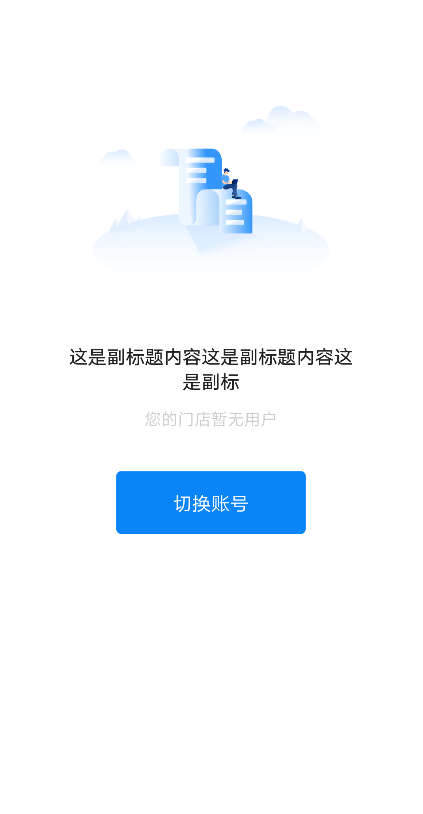
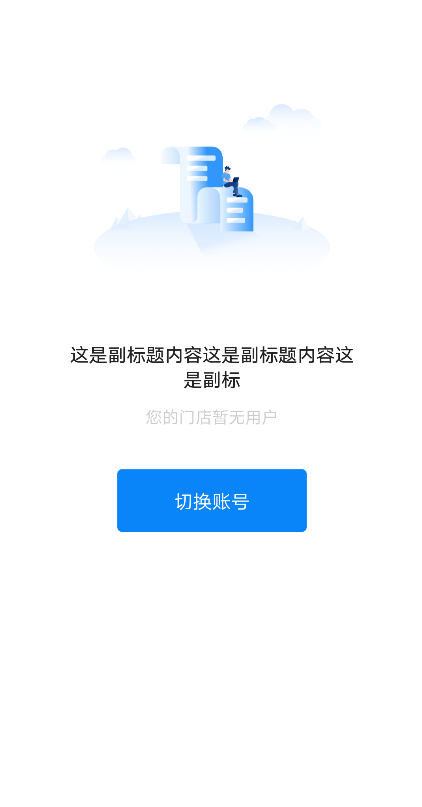
单按钮:单 Button 样式属于引导比较强的空白页面,有强烈的引导用户点击跳转的功能
双按钮:适用于所有同等级按钮的页面
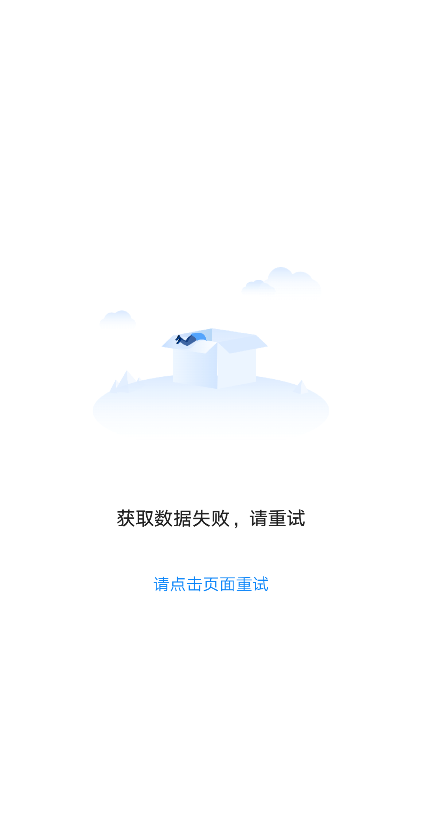
文字链:文字链按钮是操作区中引导最弱的按钮,一般用在网络比较差,引导用户“点击刷新”的页面
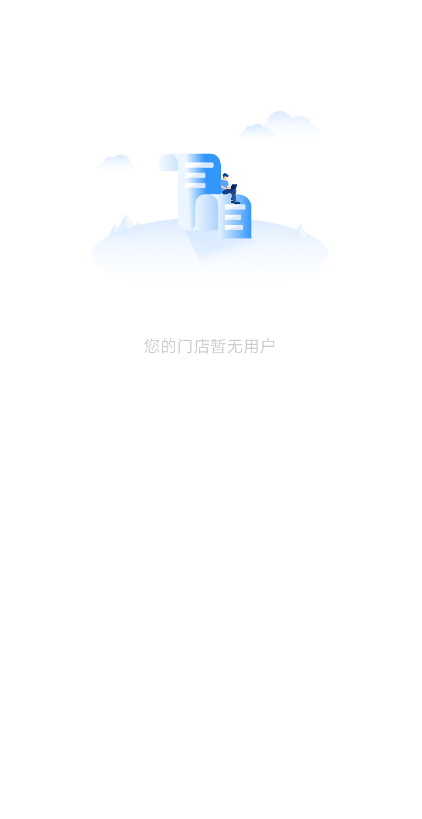
小模块空态:小的内容模块的空态,只需清晰的文字说明即可。文字 与 单按钮、双按钮一般不同时存在
## 三、构造函数及参数说明
### 构造函数
```dart
BrnAbnormalStateWidget({
this.img,
this.title,
this.content,
this.operateAreaType: OperateAreaType.TextButton,
this.operateTexts,
this.action,
this.enablePageTap: false,
this.topOffset,
this.bgColor: Colors.white,
this.isCenterVertical = false,
this.topPercent: 0.08,
this.themeData,
}) {
this.themeData ??= BrnAbnormalStateConfig();
this.themeData = BrnThemeConfigurator.instance
.getConfig(configId: this.themeData!.configId)
.abnormalStateConfig
.merge(this.themeData);
}
```
### 参数说明
| **参数名** | **参数类型** | **描述** | **是否必填** | **默认值** |
| ---------------- | ------------------------------------------------------------ | ------------------------------------------------------------ | ------------ | -------------------------- |
| img | Image? | 图片 | 否 | null |
| title | String? | 标题 | 否 | null |
| content | String? | 内容 | 否 | null |
| operateAreaType | enum OperateAreaType { SingleButton, DoubleButton, TextButton } | 操作区类型。SingleButton 为【单按钮】效果 DoubleButton 为【双按钮】效果 TextButton 为【文字链】效果 | 否 | OperateAreaType.TextButton |
| operateTexts | `List?` | 操作区文案 | 否 | null |
| action | `BrnEmptyStatusIndexedActionClickCallback? = void Function(int index)index?` | 点击回调,在 SingleButton 类型或者 enablePageTap = true 点击空白区域时返回 0;其他根据点击的位置返回。 | 否 | |
| enablePageTap | bool | 空白区域是否可点击 | 否 | false |
| topOffset | double? | 顶部距离,默认为 null,走自动计算逻辑:父视图高度的 8%,可自己指定高度 | 否 | null |
| bgColor | Color | 背景色 | 否 | Colors.white |
| isCenterVertical | bool | 内容是否垂直居中 | 否 | false |
| topPercent | double | 距顶部高度百分比 | 否 | 0.08 |
| themeData | BrnAbnormalStateConfig? | 主题配置 | 否 | 无 |
## 四、代码演示
### 效果 1:异常信息+操作
```dart
BrnAbnormalStateWidget(
img: Image.asset(
'assets/image/content_failed.png',
scale: 3.0,
),
isCenterVertical: true,
title: "获取数据失败,请重试",
operateTexts: ["请点击页面重试"],
operateAreaType: OperateAreaType.textButton,
action: (index) {
BrnToast.show("获取数据失败,请重试", context);
},
)
```
### 效果 2:异常展示

```dart
BrnAbnormalStateWidget(
img: Image.asset(
'assets/image/network_error.png',
scale: 3.0,
),
title: '网络数据异常',
);
```
### 效果 3:大模块空态

```dart
BrnAbnormalStateWidget(
img: Image.asset(
'assets/image/no_data.png',
scale: 3.0,
),
content: '您的门店暂无用户',
);
```
### 效果 4:单按钮效果

```dart
BrnAbnormalStateWidget(
img: Image.asset(
'assets/image/no_data.png',
scale: 3.0,
),
title: "这是副标题内容这是副标题内容这是副标",
content: '您的门店暂无用户',
operateAreaType: OperateAreaType.singleButton,
operateTexts: ["切换账号"],
action: (_) {
BrnToast.show("第$_个按钮被点击了", context);
},
);
```
### 效果 5:双按钮效果

```dart
BrnAbnormalStateWidget(
img: Image.asset(
'assets/image/no_data.png',
scale: 3.0,
),
title: "暂无",
content: '您还没有在维护的信息哦',
operateAreaType: OperateAreaType.doubleButton,
operateTexts: ['去添加', '去修改'],
action: (_) {
BrnToast.show("第$_个按钮被点击了", context);
},
);
```
## 二、描述
### 适用场景
1. 页面数据为空的情况,如:网络错误、数据为空的提示和引导
2. 主要分为一下四个部分:
单按钮:单 Button 样式属于引导比较强的空白页面,有强烈的引导用户点击跳转的功能
双按钮:适用于所有同等级按钮的页面
文字链:文字链按钮是操作区中引导最弱的按钮,一般用在网络比较差,引导用户“点击刷新”的页面
小模块空态:小的内容模块的空态,只需清晰的文字说明即可。文字 与 单按钮、双按钮一般不同时存在
## 三、构造函数及参数说明
### 构造函数
```dart
BrnAbnormalStateWidget({
this.img,
this.title,
this.content,
this.operateAreaType: OperateAreaType.TextButton,
this.operateTexts,
this.action,
this.enablePageTap: false,
this.topOffset,
this.bgColor: Colors.white,
this.isCenterVertical = false,
this.topPercent: 0.08,
this.themeData,
}) {
this.themeData ??= BrnAbnormalStateConfig();
this.themeData = BrnThemeConfigurator.instance
.getConfig(configId: this.themeData!.configId)
.abnormalStateConfig
.merge(this.themeData);
}
```
### 参数说明
| **参数名** | **参数类型** | **描述** | **是否必填** | **默认值** |
| ---------------- | ------------------------------------------------------------ | ------------------------------------------------------------ | ------------ | -------------------------- |
| img | Image? | 图片 | 否 | null |
| title | String? | 标题 | 否 | null |
| content | String? | 内容 | 否 | null |
| operateAreaType | enum OperateAreaType { SingleButton, DoubleButton, TextButton } | 操作区类型。SingleButton 为【单按钮】效果 DoubleButton 为【双按钮】效果 TextButton 为【文字链】效果 | 否 | OperateAreaType.TextButton |
| operateTexts | `List?` | 操作区文案 | 否 | null |
| action | `BrnEmptyStatusIndexedActionClickCallback? = void Function(int index)index?` | 点击回调,在 SingleButton 类型或者 enablePageTap = true 点击空白区域时返回 0;其他根据点击的位置返回。 | 否 | |
| enablePageTap | bool | 空白区域是否可点击 | 否 | false |
| topOffset | double? | 顶部距离,默认为 null,走自动计算逻辑:父视图高度的 8%,可自己指定高度 | 否 | null |
| bgColor | Color | 背景色 | 否 | Colors.white |
| isCenterVertical | bool | 内容是否垂直居中 | 否 | false |
| topPercent | double | 距顶部高度百分比 | 否 | 0.08 |
| themeData | BrnAbnormalStateConfig? | 主题配置 | 否 | 无 |
## 四、代码演示
### 效果 1:异常信息+操作
```dart
BrnAbnormalStateWidget(
img: Image.asset(
'assets/image/content_failed.png',
scale: 3.0,
),
isCenterVertical: true,
title: "获取数据失败,请重试",
operateTexts: ["请点击页面重试"],
operateAreaType: OperateAreaType.textButton,
action: (index) {
BrnToast.show("获取数据失败,请重试", context);
},
)
```
### 效果 2:异常展示

```dart
BrnAbnormalStateWidget(
img: Image.asset(
'assets/image/network_error.png',
scale: 3.0,
),
title: '网络数据异常',
);
```
### 效果 3:大模块空态

```dart
BrnAbnormalStateWidget(
img: Image.asset(
'assets/image/no_data.png',
scale: 3.0,
),
content: '您的门店暂无用户',
);
```
### 效果 4:单按钮效果

```dart
BrnAbnormalStateWidget(
img: Image.asset(
'assets/image/no_data.png',
scale: 3.0,
),
title: "这是副标题内容这是副标题内容这是副标",
content: '您的门店暂无用户',
operateAreaType: OperateAreaType.singleButton,
operateTexts: ["切换账号"],
action: (_) {
BrnToast.show("第$_个按钮被点击了", context);
},
);
```
### 效果 5:双按钮效果

```dart
BrnAbnormalStateWidget(
img: Image.asset(
'assets/image/no_data.png',
scale: 3.0,
),
title: "暂无",
content: '您还没有在维护的信息哦',
operateAreaType: OperateAreaType.doubleButton,
operateTexts: ['去添加', '去修改'],
action: (_) {
BrnToast.show("第$_个按钮被点击了", context);
},
);
```