---
title: BrnScrollAnchorTabWidget
group:
title: Rating
order: 26
---
# BrnAnchorTab
锚点定位
## 一、效果总览
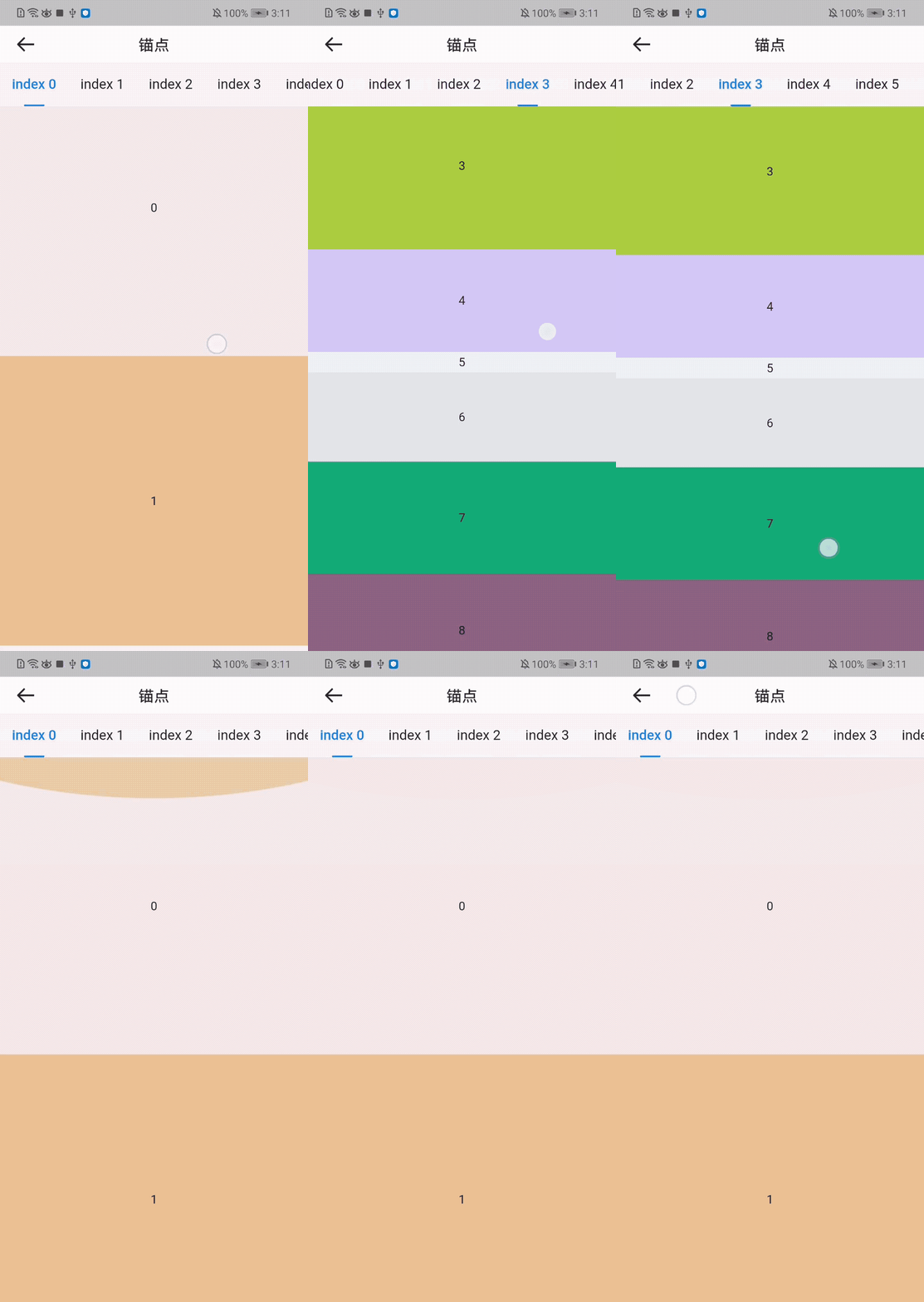 ## 二、描述
### 注意事项
1. 该组件提供了tab和下面list绑定滑动的功能,使用者只需要提供tab的widget和待滚动的数组widget即可。
2. 由于flutter不支持预加载,因此异步的卡片,会造成计算不准确。
## 三、构造函数和参数说明
### 构造函数
```dart
BrnAnchorTab(
{required this.widgetIndexedBuilder,
required this.tabIndexedBuilder,
required this.itemCount,
this.tabDivider,
this.tabBarStyle = const BrnAnchorTabBarStyle()});
```
### 参数说明
| **参数名** | **参数类型** | **描述** | **是否必填** | **默认值** |
| --- | --- | --- | --- | --- |
| tabBarStyle | TabBarStyle | 自定义Tab的样式,比如是否可滑动,选中的颜色等等 | 否 | 默认为不可滑动 |
| widgetIndexedBuilder | ScrollWidgetIndexedBuilder | 指定index的卡片widget | 是 | 无 |
| tabIndexedBuilder | TabIndexedBuilder | 指定index的Tab | 是 | 无 |
| itemCount | int | Tab和卡片Widget的数量 | 是 | 无 |
| tabDivider | Widget? | tab间填充的Widget | 否 | 无 |
## 四、效果及代码展示
### 效果1
```dart
@override
Widget build(BuildContext context) {
return Scaffold(
appBar: BrnAppBar(
title: '锚点',
),
body: BrnAnchorTab(
itemCount: 10,
widgetIndexedBuilder: (context, index) {
return Container(
child: Center(child: Text('$index')),
height: Random().nextInt(400).toDouble(),
color: Color.fromARGB(Random().nextInt(255), Random().nextInt(255),
Random().nextInt(255), Random().nextInt(255)),
);
},
tabIndexedBuilder: (context, index) {
return BadgeTab(
text: 'index $index'
);
},
),
);
}
```
## 二、描述
### 注意事项
1. 该组件提供了tab和下面list绑定滑动的功能,使用者只需要提供tab的widget和待滚动的数组widget即可。
2. 由于flutter不支持预加载,因此异步的卡片,会造成计算不准确。
## 三、构造函数和参数说明
### 构造函数
```dart
BrnAnchorTab(
{required this.widgetIndexedBuilder,
required this.tabIndexedBuilder,
required this.itemCount,
this.tabDivider,
this.tabBarStyle = const BrnAnchorTabBarStyle()});
```
### 参数说明
| **参数名** | **参数类型** | **描述** | **是否必填** | **默认值** |
| --- | --- | --- | --- | --- |
| tabBarStyle | TabBarStyle | 自定义Tab的样式,比如是否可滑动,选中的颜色等等 | 否 | 默认为不可滑动 |
| widgetIndexedBuilder | ScrollWidgetIndexedBuilder | 指定index的卡片widget | 是 | 无 |
| tabIndexedBuilder | TabIndexedBuilder | 指定index的Tab | 是 | 无 |
| itemCount | int | Tab和卡片Widget的数量 | 是 | 无 |
| tabDivider | Widget? | tab间填充的Widget | 否 | 无 |
## 四、效果及代码展示
### 效果1
```dart
@override
Widget build(BuildContext context) {
return Scaffold(
appBar: BrnAppBar(
title: '锚点',
),
body: BrnAnchorTab(
itemCount: 10,
widgetIndexedBuilder: (context, index) {
return Container(
child: Center(child: Text('$index')),
height: Random().nextInt(400).toDouble(),
color: Color.fromARGB(Random().nextInt(255), Random().nextInt(255),
Random().nextInt(255), Random().nextInt(255)),
);
},
tabIndexedBuilder: (context, index) {
return BadgeTab(
text: 'index $index'
);
},
),
);
}
```