---
title: Funnel 漏斗图
group:
title: 数据图表
order: 2
---
# BrnFunnelChart
漏斗图
## 一、效果总览
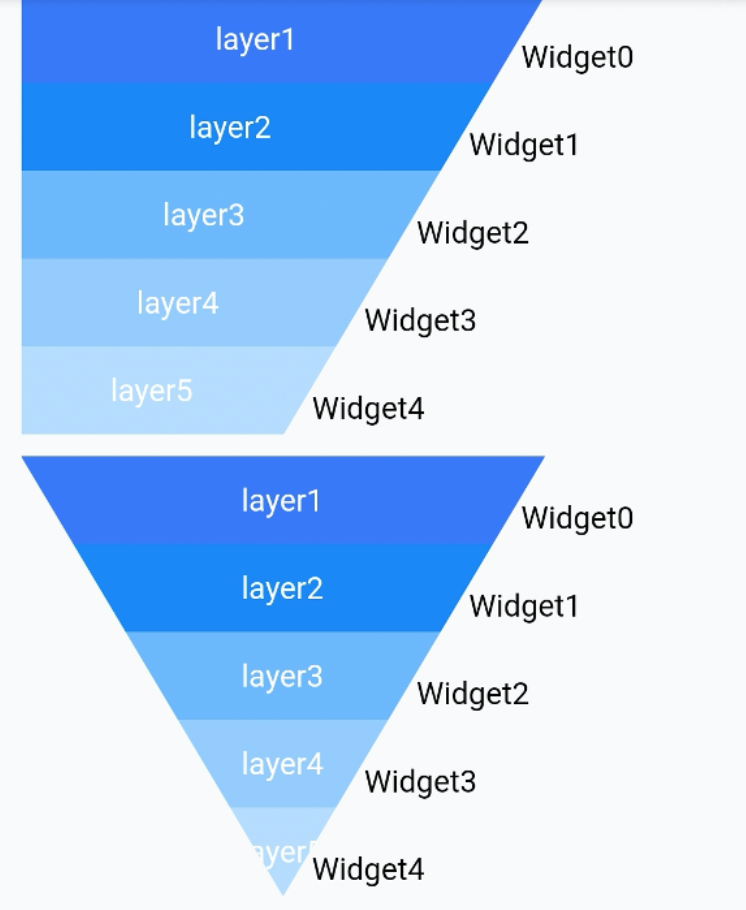
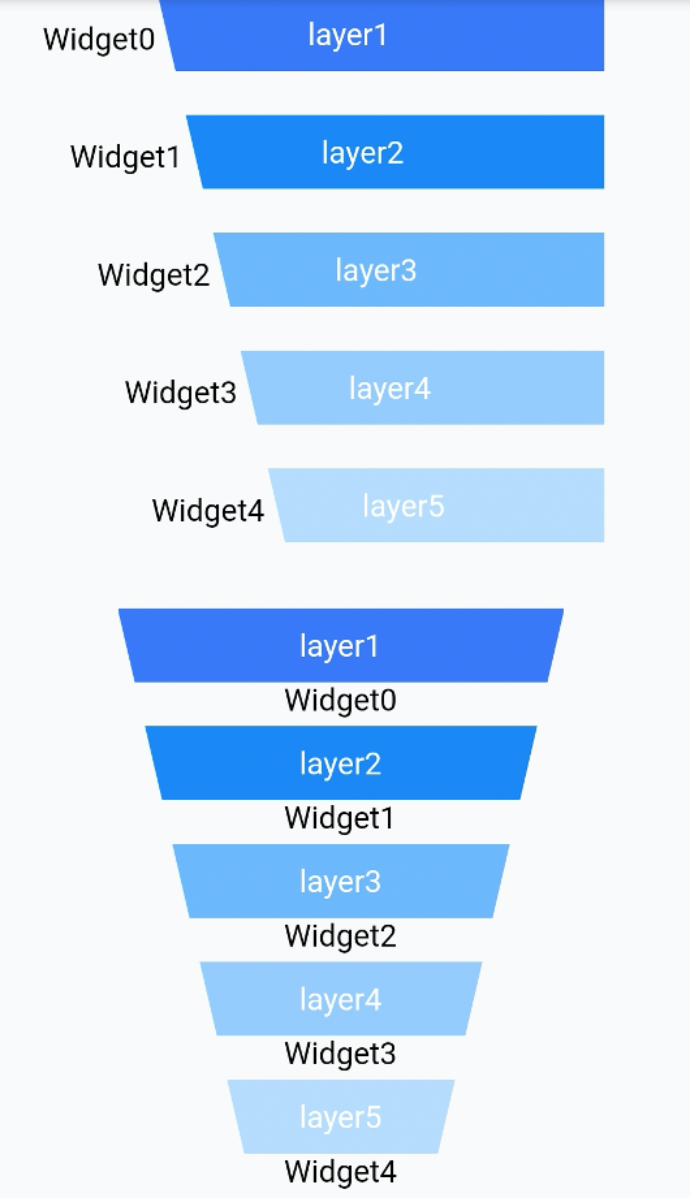 ## 二、描述
### 使用场景
1. 通常用于表达转化率的场景
2. 需要定制化漏斗图的场景
### 使用方式
在介绍使用方式前,先介绍漏斗图的几个基础概念。
## 二、描述
### 使用场景
1. 通常用于表达转化率的场景
2. 需要定制化漏斗图的场景
### 使用方式
在介绍使用方式前,先介绍漏斗图的几个基础概念。
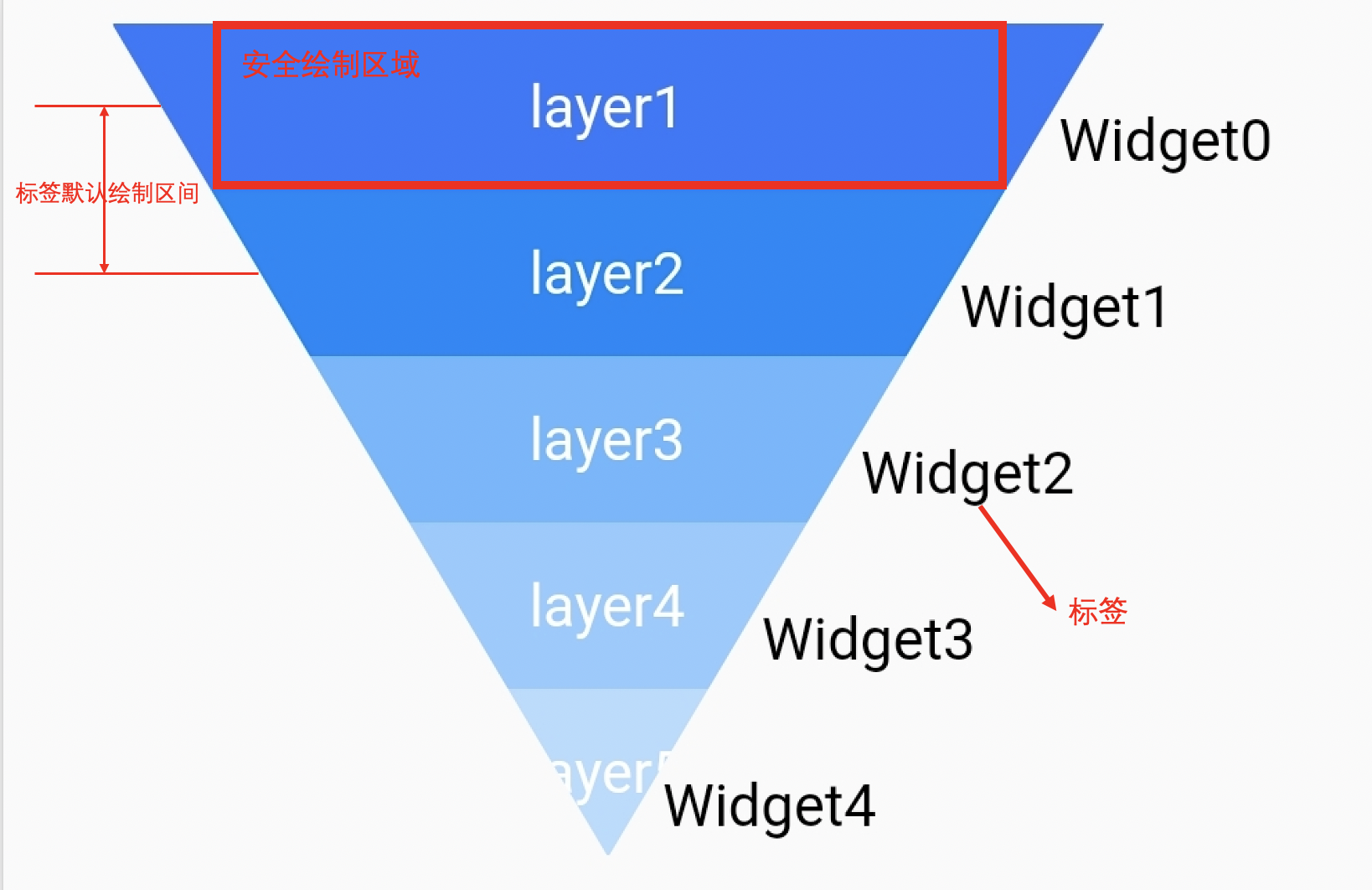 如图是一个标准的漏斗图:
`layer` 代表漏斗的每一层,每一层之间的间距是可调整的。
`Widget` 是我们的标签,用户可以使用 Text 外其他 Widget。
一般来说标签的个数比 layer 的个数少一个,因为标签一般用于标识 layer 之间的关系。
这些标签的默认摆放位置如图上左上角标识出来,即 top 为上一层 layer 的中点,bottom 为下一层 layer 的中点。用户可以通过修改 XY 偏移量来进行调整摆放的位置。
在每层 layer 中可以自行绘制文案,如图中的 layer1,layer2。图中所标识的安全绘制区域表示在这区域内文案不会被裁剪,超出这个区域就有被裁剪的可能。这个区域会在回调中提供给使用者。
## 三、构造方法及参数说明
### 构造函数
```dart
BrnFunnelChart({
Key? key,
required this.layerCount,
required this.markerCount,
required this.layerPainter,
required MarkerBuilder builder,
this.shape = FunnelShape.leftAndRight,
this.maxLayerWidth = 200,
this.minLayerWidth = 0,
this.layerHeight = 40,
this.layerMargin = 0,
this.childOffset = Offset.zero,
this.alignment = MarkerAlignment.right,
})
```
### 参数说明
| 参数名 | 参数类型 | 描述 | 是否必填 | 默认值 | 备注 |
| ------------- | --------------------- | --------------------------- | -------- | ------------------------ | ------------------------------------------------------------ |
| layerCount | int | 漏斗图的层级数 | 是 | | |
| markerCount | int | 漏斗图的标签个数 | 是 | | 标签个数和层技数必须相等或者是少一个 |
| layerPainer | BrnFunnelLayerPainter | 用于控制绘制每一次层的文案 | 是 | | 见详细 BrnFunnelLayerPainter 介绍 |
| builder | Function | 用于提供每一层的标签 Widget | 是 | | |
| shape | FunnelShape | 用于控制漏斗的形状 | 否 | FunnelShape.LeftAndRight | FunnelShape.LeftAndRight 表示倒三角的漏斗图形状 FunnelShape.LeftorRight 表示梯形形状的漏斗图 |
| maxLayerWidth | double | 漏斗每层的最大宽度 | 否 | 200 | |
| minLayerWidth | double | 漏斗每层的最小宽度 | 否 | 0 | |
| layerHeight | double | 漏斗每层的高度 | 否 | 40 | |
| layerMargin | double | 漏斗每层的间距 | 否 | 0 | |
| childOffset | Offset | 标签的偏移量 | 否 | Offset.Zero | 标签在初始摆放位置上的相对偏移量 |
| alignment | MarkerAlignment | 标签的对齐方式 | 否 | MarkerAlignment.right | 总共有三种情况偏左,居中和偏右。当漏斗 shape 为 FunnelShape.leftOrRight 时不能设置成居中 |
#### BrnFunnelLayerPainter
用于控制每一层文案的绘制
```dart
abstract class BrnFunnelLayerPainter {
///该层layer的颜色是否渐变
bool isGradient(int layerIndex);
///该层layer的颜色值
List getLayerColors(int layerIndex);
///当需要绘制Layer的时候,会调用该方法。子类在该方法里实现自己的绘制逻辑。
///[canvas] 提供的画布,对画布进行旋转裁剪等特殊操作,一定要调用[canvas.save()]操作。
///[left],[top],[right],[bottom]是提供给调用者绘制的一个安全区域,超过这个区域限制,可能会被截断
///[layerIndex] 漏斗的layer index。
void paintLayer(Canvas canvas, double left, double top, double right,
double bottom, int layerIndex);
}
```
## 四、代码演示
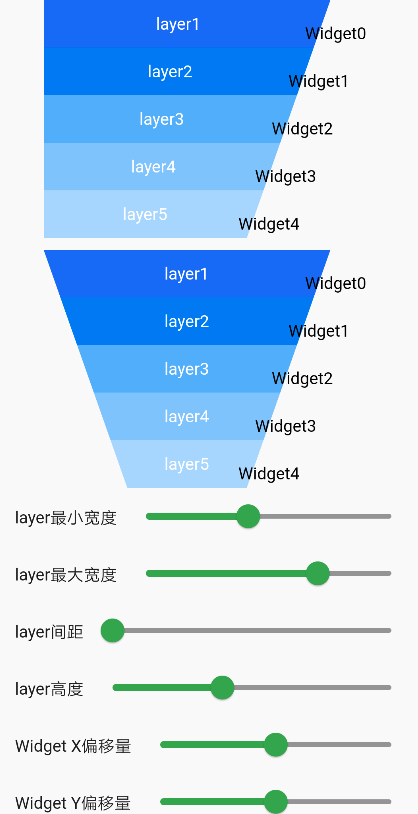
### 效果1:
```dart
BrnFunnelChart(
shape: FunnelShape.leftOrRight,
alignment: MarkerAlignment.right,
maxLayerWidth: maxLayerWidth,
minLayerWidth: minLayerWidth,
layerMargin: layerMargin,
layerHeight: layerHeight,
markerCount: 5,
childOffset: Offset(offsetX, offsetY),
layerPainter: BrnDefaultFunnelLayerPainter(
titles: ['layer1', 'layer2', 'layer3', 'layer4', 'layer5']),
layerCount: 5,
builder: (index) {
return Container(
child: Row(
crossAxisAlignment: CrossAxisAlignment.center,
mainAxisSize: MainAxisSize.min,
children: [
Text(
'Widget${index.toString()}',
style: TextStyle(color: Colors.black, fontSize: 14),
),
]),
);
},
)
```
```dart
BrnFunnelChart(
shape: FunnelShape.LeftAndRight,
alignment: alignment,
maxLayerWidth: maxLayerWidth,
minLayerWidth: minLayerWidth,
layerMargin: layerMargin,
layerHeight: layerHeight,
markerCount: 5,
childOffset: Offset(offsetX, offsetY),
layerPainter: BrnDefaultFunnelLayerPainter(
titles: ['layer1', 'layer2', 'layer3', 'layer4', 'layer5']),
layerCount: 5,
builder: (index) {
return Container(
child: Row(
crossAxisAlignment: CrossAxisAlignment.center,
mainAxisSize: MainAxisSize.min,
children: [
Text(
'Widget${index.toString()}',
style: TextStyle(color: Colors.black, fontSize: 14),
),
]),
);
},
)
```
如图是一个标准的漏斗图:
`layer` 代表漏斗的每一层,每一层之间的间距是可调整的。
`Widget` 是我们的标签,用户可以使用 Text 外其他 Widget。
一般来说标签的个数比 layer 的个数少一个,因为标签一般用于标识 layer 之间的关系。
这些标签的默认摆放位置如图上左上角标识出来,即 top 为上一层 layer 的中点,bottom 为下一层 layer 的中点。用户可以通过修改 XY 偏移量来进行调整摆放的位置。
在每层 layer 中可以自行绘制文案,如图中的 layer1,layer2。图中所标识的安全绘制区域表示在这区域内文案不会被裁剪,超出这个区域就有被裁剪的可能。这个区域会在回调中提供给使用者。
## 三、构造方法及参数说明
### 构造函数
```dart
BrnFunnelChart({
Key? key,
required this.layerCount,
required this.markerCount,
required this.layerPainter,
required MarkerBuilder builder,
this.shape = FunnelShape.leftAndRight,
this.maxLayerWidth = 200,
this.minLayerWidth = 0,
this.layerHeight = 40,
this.layerMargin = 0,
this.childOffset = Offset.zero,
this.alignment = MarkerAlignment.right,
})
```
### 参数说明
| 参数名 | 参数类型 | 描述 | 是否必填 | 默认值 | 备注 |
| ------------- | --------------------- | --------------------------- | -------- | ------------------------ | ------------------------------------------------------------ |
| layerCount | int | 漏斗图的层级数 | 是 | | |
| markerCount | int | 漏斗图的标签个数 | 是 | | 标签个数和层技数必须相等或者是少一个 |
| layerPainer | BrnFunnelLayerPainter | 用于控制绘制每一次层的文案 | 是 | | 见详细 BrnFunnelLayerPainter 介绍 |
| builder | Function | 用于提供每一层的标签 Widget | 是 | | |
| shape | FunnelShape | 用于控制漏斗的形状 | 否 | FunnelShape.LeftAndRight | FunnelShape.LeftAndRight 表示倒三角的漏斗图形状 FunnelShape.LeftorRight 表示梯形形状的漏斗图 |
| maxLayerWidth | double | 漏斗每层的最大宽度 | 否 | 200 | |
| minLayerWidth | double | 漏斗每层的最小宽度 | 否 | 0 | |
| layerHeight | double | 漏斗每层的高度 | 否 | 40 | |
| layerMargin | double | 漏斗每层的间距 | 否 | 0 | |
| childOffset | Offset | 标签的偏移量 | 否 | Offset.Zero | 标签在初始摆放位置上的相对偏移量 |
| alignment | MarkerAlignment | 标签的对齐方式 | 否 | MarkerAlignment.right | 总共有三种情况偏左,居中和偏右。当漏斗 shape 为 FunnelShape.leftOrRight 时不能设置成居中 |
#### BrnFunnelLayerPainter
用于控制每一层文案的绘制
```dart
abstract class BrnFunnelLayerPainter {
///该层layer的颜色是否渐变
bool isGradient(int layerIndex);
///该层layer的颜色值
List getLayerColors(int layerIndex);
///当需要绘制Layer的时候,会调用该方法。子类在该方法里实现自己的绘制逻辑。
///[canvas] 提供的画布,对画布进行旋转裁剪等特殊操作,一定要调用[canvas.save()]操作。
///[left],[top],[right],[bottom]是提供给调用者绘制的一个安全区域,超过这个区域限制,可能会被截断
///[layerIndex] 漏斗的layer index。
void paintLayer(Canvas canvas, double left, double top, double right,
double bottom, int layerIndex);
}
```
## 四、代码演示
### 效果1:

```dart
BrnFunnelChart(
shape: FunnelShape.leftOrRight,
alignment: MarkerAlignment.right,
maxLayerWidth: maxLayerWidth,
minLayerWidth: minLayerWidth,
layerMargin: layerMargin,
layerHeight: layerHeight,
markerCount: 5,
childOffset: Offset(offsetX, offsetY),
layerPainter: BrnDefaultFunnelLayerPainter(
titles: ['layer1', 'layer2', 'layer3', 'layer4', 'layer5']),
layerCount: 5,
builder: (index) {
return Container(
child: Row(
crossAxisAlignment: CrossAxisAlignment.center,
mainAxisSize: MainAxisSize.min,
children: [
Text(
'Widget${index.toString()}',
style: TextStyle(color: Colors.black, fontSize: 14),
),
]),
);
},
)
```
```dart
BrnFunnelChart(
shape: FunnelShape.LeftAndRight,
alignment: alignment,
maxLayerWidth: maxLayerWidth,
minLayerWidth: minLayerWidth,
layerMargin: layerMargin,
layerHeight: layerHeight,
markerCount: 5,
childOffset: Offset(offsetX, offsetY),
layerPainter: BrnDefaultFunnelLayerPainter(
titles: ['layer1', 'layer2', 'layer3', 'layer4', 'layer5']),
layerCount: 5,
builder: (index) {
return Container(
child: Row(
crossAxisAlignment: CrossAxisAlignment.center,
mainAxisSize: MainAxisSize.min,
children: [
Text(
'Widget${index.toString()}',
style: TextStyle(color: Colors.black, fontSize: 14),
),
]),
);
},
)
```