---
title: BrnExpandableGroup
group:
title: Form
order: 12
---
# BrnExpandableGroup
可展开收起的表单项组类型
## 一、效果总览

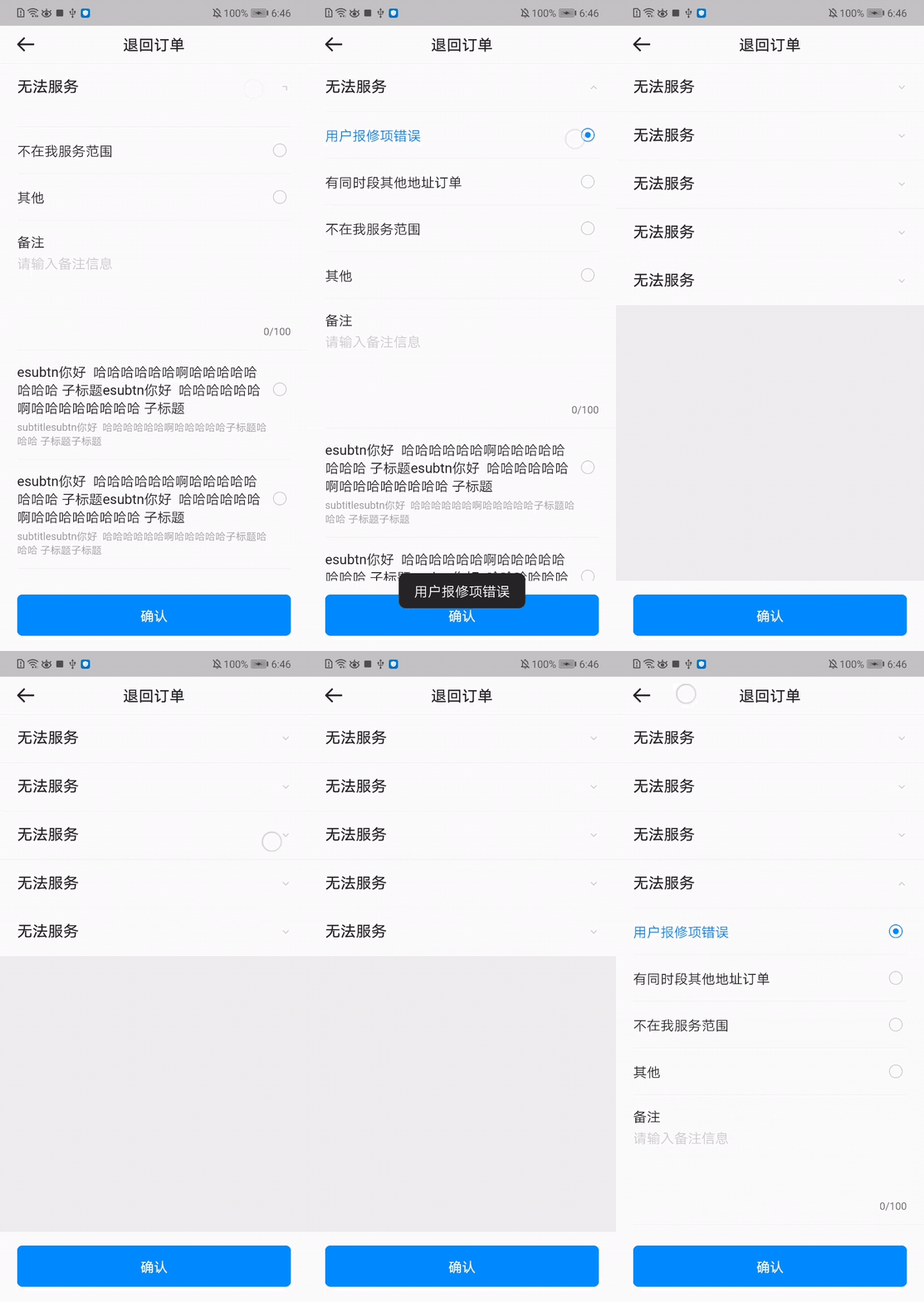 ## 二、描述
### 适用场景
一般用于数据录入页面中,可以触发展开收起的能力
## 三、构造函数及参数说明
### 构造函数
```dart
BrnExpandableGroup({
Key? key,
required this.title,
this.subtitle,
this.backgroundColor,
this.onExpansionChanged,
this.children = const [],
this.initiallyExpanded = false,
this.themeData,
}) : super(key: key) {
this.themeData ??= BrnFormItemConfig();
this.themeData = BrnThemeConfigurator.instance
.getConfig(configId: this.themeData!.configId)
.formItemConfig
.merge(this.themeData);
this.themeData = themeData!.merge(BrnFormItemConfig(backgroundColor: backgroundColor));
}
```
### 参数说明
| **参数名** | **参数类型** | **描述** | **是否必填** | **默认值** |
| ------------------ | --------------------- | -------------------------------------------------- | ------------ | ----------- |
| title | String | 标题 | 是 | 无 |
| subTitle | String? | 子标题 | 否 | 无 |
| backgroundColor | Color? | 背景色 | 否 | transparent |
| onExpansionChanged | `ValueChanged?` | 状态变化回调 | 否 | 无 |
| children | `List` | 内容 Widget List 表 | 否 | 无 |
| initiallyExpanded | bool | 初始状态(true 展开,false 不展开) | 否 | false |
| themeData | BrnFormItemConfig? | 表单项主题配置,具体配置信息详见 BrnFormItemConfig | 否 | |
## 四、代码演示
### 效果1
```dart
class FormPageDemo extends StatefulWidget {
@override
_FormPageDemoState createState() => _FormPageDemoState();
}
````
```dart
class _FormPageDemoState extends State {
List selectedOptions = List();
String commentStr;
BrnPortraitRadioGroupOption selectedValue;
@override
void initState() {
super.initState();
}
@override
Widget build(BuildContext context) {
return Scaffold(
backgroundColor: Color(0xFFF0F0F0),
resizeToAvoidBottomInset: true,
appBar: BrnAppBar(
title: '退回订单',
),
body: SafeArea(
child: Column(
children: [
Expanded(
child: ListView.separated(
shrinkWrap: true,
itemBuilder: (context, index) {
return BrnExpandableGroup(
title: "无法服务",
children: [
BrnPortraitRadioGroup.withSimpleList(
options: [
'用户报修项错误',
'有同时段其他地址订单',
'不在我服务范围',
'其他'
],
selectedOption: selectedValue?.title,
onChanged: (BrnPortraitRadioGroupOption old,
BrnPortraitRadioGroupOption newList) {
BrnToast.show(newList.title, context);
selectedValue = newList;
commentStr = '';
setState(() {});
},
),
BrnTextBlockInputFormItem(
title: '备注',
hint: '请输入备注信息',
maxCharCount: 100,
onChanged: (String newStr) {
commentStr = newStr;
},
),
BrnPortraitRadioGroup.withOptions(
isCollapseContent: false,
options: List.generate(3, (index) {
return BrnPortraitRadioGroupOption(
title:
'esubtn你好 哈哈哈哈哈哈啊哈哈哈哈哈哈哈哈 子标题esubtn你好 哈哈哈哈哈哈啊哈哈哈哈哈哈哈哈 子标题',
subTitle: 'subtitlesubtn你好 哈哈哈哈哈哈啊哈哈哈哈哈子标题哈哈哈 子标题子标题');
}),
selectedOption: selectedValue,
onChanged: (BrnPortraitRadioGroupOption old,
BrnPortraitRadioGroupOption newList) {
BrnToast.show(newList.title, context);
selectedValue = newList;
commentStr = '';
setState(() {});
},
),
],
);
},
separatorBuilder: (context, index) {
return BrnLine();
},
itemCount: 5),
),
Align(
alignment: Alignment.bottomCenter,
child: BrnBottomButtonPanel(
mainButtonName: '确认',
mainButtonOnTap: () {
BrnToast.show(
'原因:' + selectedOptions.toString() + '\n备注:' + (commentStr ?? ''), context);
},
),
)
],
),
),
);
}
}
````
## 二、描述
### 适用场景
一般用于数据录入页面中,可以触发展开收起的能力
## 三、构造函数及参数说明
### 构造函数
```dart
BrnExpandableGroup({
Key? key,
required this.title,
this.subtitle,
this.backgroundColor,
this.onExpansionChanged,
this.children = const [],
this.initiallyExpanded = false,
this.themeData,
}) : super(key: key) {
this.themeData ??= BrnFormItemConfig();
this.themeData = BrnThemeConfigurator.instance
.getConfig(configId: this.themeData!.configId)
.formItemConfig
.merge(this.themeData);
this.themeData = themeData!.merge(BrnFormItemConfig(backgroundColor: backgroundColor));
}
```
### 参数说明
| **参数名** | **参数类型** | **描述** | **是否必填** | **默认值** |
| ------------------ | --------------------- | -------------------------------------------------- | ------------ | ----------- |
| title | String | 标题 | 是 | 无 |
| subTitle | String? | 子标题 | 否 | 无 |
| backgroundColor | Color? | 背景色 | 否 | transparent |
| onExpansionChanged | `ValueChanged?` | 状态变化回调 | 否 | 无 |
| children | `List` | 内容 Widget List 表 | 否 | 无 |
| initiallyExpanded | bool | 初始状态(true 展开,false 不展开) | 否 | false |
| themeData | BrnFormItemConfig? | 表单项主题配置,具体配置信息详见 BrnFormItemConfig | 否 | |
## 四、代码演示
### 效果1
```dart
class FormPageDemo extends StatefulWidget {
@override
_FormPageDemoState createState() => _FormPageDemoState();
}
````
```dart
class _FormPageDemoState extends State {
List selectedOptions = List();
String commentStr;
BrnPortraitRadioGroupOption selectedValue;
@override
void initState() {
super.initState();
}
@override
Widget build(BuildContext context) {
return Scaffold(
backgroundColor: Color(0xFFF0F0F0),
resizeToAvoidBottomInset: true,
appBar: BrnAppBar(
title: '退回订单',
),
body: SafeArea(
child: Column(
children: [
Expanded(
child: ListView.separated(
shrinkWrap: true,
itemBuilder: (context, index) {
return BrnExpandableGroup(
title: "无法服务",
children: [
BrnPortraitRadioGroup.withSimpleList(
options: [
'用户报修项错误',
'有同时段其他地址订单',
'不在我服务范围',
'其他'
],
selectedOption: selectedValue?.title,
onChanged: (BrnPortraitRadioGroupOption old,
BrnPortraitRadioGroupOption newList) {
BrnToast.show(newList.title, context);
selectedValue = newList;
commentStr = '';
setState(() {});
},
),
BrnTextBlockInputFormItem(
title: '备注',
hint: '请输入备注信息',
maxCharCount: 100,
onChanged: (String newStr) {
commentStr = newStr;
},
),
BrnPortraitRadioGroup.withOptions(
isCollapseContent: false,
options: List.generate(3, (index) {
return BrnPortraitRadioGroupOption(
title:
'esubtn你好 哈哈哈哈哈哈啊哈哈哈哈哈哈哈哈 子标题esubtn你好 哈哈哈哈哈哈啊哈哈哈哈哈哈哈哈 子标题',
subTitle: 'subtitlesubtn你好 哈哈哈哈哈哈啊哈哈哈哈哈子标题哈哈哈 子标题子标题');
}),
selectedOption: selectedValue,
onChanged: (BrnPortraitRadioGroupOption old,
BrnPortraitRadioGroupOption newList) {
BrnToast.show(newList.title, context);
selectedValue = newList;
commentStr = '';
setState(() {});
},
),
],
);
},
separatorBuilder: (context, index) {
return BrnLine();
},
itemCount: 5),
),
Align(
alignment: Alignment.bottomCenter,
child: BrnBottomButtonPanel(
mainButtonName: '确认',
mainButtonOnTap: () {
BrnToast.show(
'原因:' + selectedOptions.toString() + '\n备注:' + (commentStr ?? ''), context);
},
),
)
],
),
),
);
}
}
````