---
title: BrnMultiChoicePortraitInputFormItem
group:
title: Form
order: 12
---
# BrnMultiChoicePortraitInputFormItem
## 一、效果总览
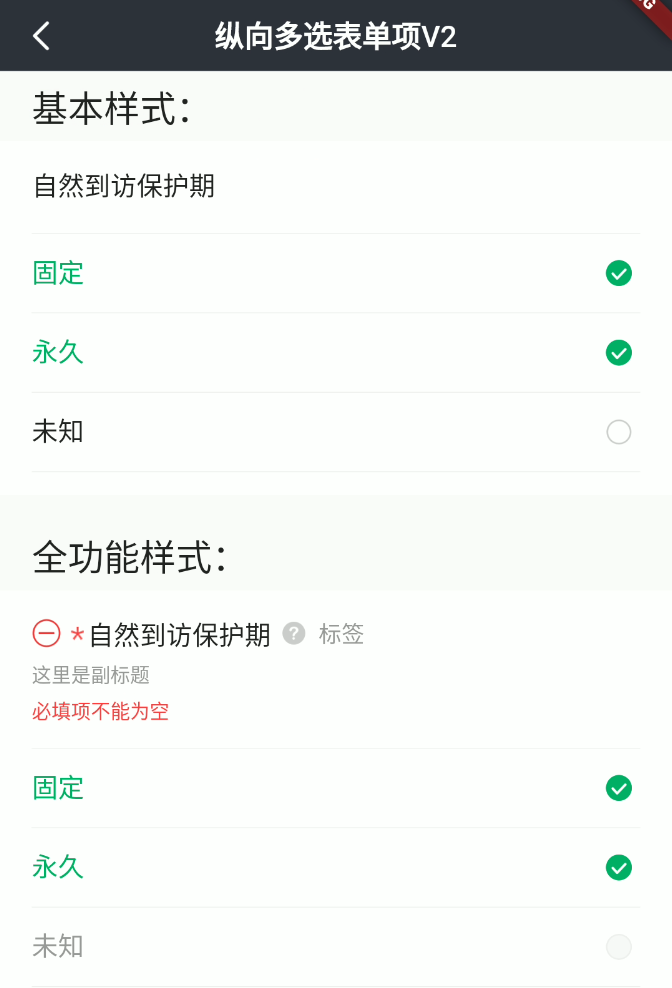 ## 二、描述
### 适用场景
1. 用于纵向多选录入
2. 支持全局/部分选项禁用
包括"标题"、"副标题"、"错误信息提示"、"必填项提示"、"添加/删除按钮"、"消息提示"、"多选项"等元素。
### 交互规则
1. 设置是否为"必填项"("*")
2. 设置“添加/删除”图标("+"、"-"):用于接收回调函数处理新增/删除录入项操作
3. 设置“提示”图标&文案("?"):用于接收回调函数为用户展示提示信息
4. 设置此录入项是否可编辑(禁用)
5. 设置展示错误信息(error)
### 使用规范
一般用于纵向多选录入页面
## 三、构造函数及参数说明
### 构造函数
``` dart
BrnMultiChoicePortraitInputFormItem(
{Key? key,
this.label,
this.title = "",
this.subTitle = "",
this.tipLabel,
this.prefixIconType = BrnPrefixIconType.normal,
this.error = "",
this.isEdit = true,
this.isRequire = false,
this.onAddTap,
this.onRemoveTap,
this.onTip,
this.value = const [],
this.options = const [],
this.enableList = const [],
this.backgroundColor,
this.onChanged,
this.themeData})
: super(key: key) {
this.themeData ??= BrnFormItemConfig();
this.themeData = BrnThemeConfigurator.instance
.getConfig(configId: this.themeData!.configId)
.formItemConfig
.merge(this.themeData);
this.themeData = this.themeData!.merge(
BrnFormItemConfig(backgroundColor: backgroundColor));
}
```
### 参数说明:
| **参数名** | **参数类型** | **描述** | **是否必填** | **默认值** | **备注** |
| --- | --- | --- | --- | --- | --- |
| backgroundColor | Color? | 表单项背景色 | 否 | 走主题配置默认色值 Colors.white | |
| label | String? | 录入项的唯一标识,主要用于录入类型页面框架中 | 否 | 无 | |
| type | Stirng | 录入项类型,主要用于录入类型页面框架中 | 否 | BrnInputItemType.multiChoicePortraitInputType | 外部可根据此字段判断表单项类型 |
| title | String | 录入项标题 | 否 | '' | |
| subTitle | String? | 录入项子标题 | 否 | 无 | |
| tipLabel | String? | 录入项提示(问号图标&文案) 用户点击时触发onTip回调。 | 否 | 备注中类型3 | 1. 设置"空字符串"时展示问号图标 2. 设置"非空字符串"时展示问号图标&文案 3. 若不赋值或赋值为null时,不显示提示项 |
| prefixIconType | String | 录入项前缀图标样式 "添加项" "删除项" 详见 **BrnPrefixIconType** 类 | 否 | BrnPrefixIconType.normal | 1. 不展示图标:BrnPrefixIconType.normal 2. 展示加号图标:BrnPrefixIconType.add 3. 展示减号图标:BrnPrefixIconType.remove |
| error | String | 录入项错误提示 | 否 | '' | |
| isRequire | bool | 录入项是否为必填项(展示`*`图标) 默认为 false 不必填 | 否 | false | |
| isEdit | bool | 录入项 是否可编辑 | 否 | true | true:可编辑false:禁用 |
| onAddTap | VoidCallback? | 点击"+"图标回调 | 否 | 无 | 见**prefixIconType**字段 |
| onRemoveTap | VoidCallback? | 点击"-"图标回调 | 否 | 无 | 见**prefixIconType**字段 |
| onTip | VoidCallback? | 点击"?"图标回调 | 否 | 无 | 见**tipLabel**字段 |
| value | `List` | 设置选中的选项文案 | 否 | `const []` | |
| options | `List` | 所有选项文案 | 否 | `const []` | |
| enableList | `List` | 标识每个选项是否禁用,false:禁用 | 否 | `const []` | |
| onChanged | OnBrnFormMultiChoiceValueChanged? | 选项选中状态变化回调 | 否 | 无 | |
| themeData | BrnFormItemConfig? | form配置 | 否 | 无 | |
### 其他数据说明:
###### BrnPrefixIconType:
```dart
class BrnPrefixIconType {
static const String normal = "type_normal";
static const String add = "type_add";
static const String remove = "type_remove";
}
```
## 四、代码演示
### 效果1:基本样式
## 二、描述
### 适用场景
1. 用于纵向多选录入
2. 支持全局/部分选项禁用
包括"标题"、"副标题"、"错误信息提示"、"必填项提示"、"添加/删除按钮"、"消息提示"、"多选项"等元素。
### 交互规则
1. 设置是否为"必填项"("*")
2. 设置“添加/删除”图标("+"、"-"):用于接收回调函数处理新增/删除录入项操作
3. 设置“提示”图标&文案("?"):用于接收回调函数为用户展示提示信息
4. 设置此录入项是否可编辑(禁用)
5. 设置展示错误信息(error)
### 使用规范
一般用于纵向多选录入页面
## 三、构造函数及参数说明
### 构造函数
``` dart
BrnMultiChoicePortraitInputFormItem(
{Key? key,
this.label,
this.title = "",
this.subTitle = "",
this.tipLabel,
this.prefixIconType = BrnPrefixIconType.normal,
this.error = "",
this.isEdit = true,
this.isRequire = false,
this.onAddTap,
this.onRemoveTap,
this.onTip,
this.value = const [],
this.options = const [],
this.enableList = const [],
this.backgroundColor,
this.onChanged,
this.themeData})
: super(key: key) {
this.themeData ??= BrnFormItemConfig();
this.themeData = BrnThemeConfigurator.instance
.getConfig(configId: this.themeData!.configId)
.formItemConfig
.merge(this.themeData);
this.themeData = this.themeData!.merge(
BrnFormItemConfig(backgroundColor: backgroundColor));
}
```
### 参数说明:
| **参数名** | **参数类型** | **描述** | **是否必填** | **默认值** | **备注** |
| --- | --- | --- | --- | --- | --- |
| backgroundColor | Color? | 表单项背景色 | 否 | 走主题配置默认色值 Colors.white | |
| label | String? | 录入项的唯一标识,主要用于录入类型页面框架中 | 否 | 无 | |
| type | Stirng | 录入项类型,主要用于录入类型页面框架中 | 否 | BrnInputItemType.multiChoicePortraitInputType | 外部可根据此字段判断表单项类型 |
| title | String | 录入项标题 | 否 | '' | |
| subTitle | String? | 录入项子标题 | 否 | 无 | |
| tipLabel | String? | 录入项提示(问号图标&文案) 用户点击时触发onTip回调。 | 否 | 备注中类型3 | 1. 设置"空字符串"时展示问号图标 2. 设置"非空字符串"时展示问号图标&文案 3. 若不赋值或赋值为null时,不显示提示项 |
| prefixIconType | String | 录入项前缀图标样式 "添加项" "删除项" 详见 **BrnPrefixIconType** 类 | 否 | BrnPrefixIconType.normal | 1. 不展示图标:BrnPrefixIconType.normal 2. 展示加号图标:BrnPrefixIconType.add 3. 展示减号图标:BrnPrefixIconType.remove |
| error | String | 录入项错误提示 | 否 | '' | |
| isRequire | bool | 录入项是否为必填项(展示`*`图标) 默认为 false 不必填 | 否 | false | |
| isEdit | bool | 录入项 是否可编辑 | 否 | true | true:可编辑false:禁用 |
| onAddTap | VoidCallback? | 点击"+"图标回调 | 否 | 无 | 见**prefixIconType**字段 |
| onRemoveTap | VoidCallback? | 点击"-"图标回调 | 否 | 无 | 见**prefixIconType**字段 |
| onTip | VoidCallback? | 点击"?"图标回调 | 否 | 无 | 见**tipLabel**字段 |
| value | `List` | 设置选中的选项文案 | 否 | `const []` | |
| options | `List` | 所有选项文案 | 否 | `const []` | |
| enableList | `List` | 标识每个选项是否禁用,false:禁用 | 否 | `const []` | |
| onChanged | OnBrnFormMultiChoiceValueChanged? | 选项选中状态变化回调 | 否 | 无 | |
| themeData | BrnFormItemConfig? | form配置 | 否 | 无 | |
### 其他数据说明:
###### BrnPrefixIconType:
```dart
class BrnPrefixIconType {
static const String normal = "type_normal";
static const String add = "type_add";
static const String remove = "type_remove";
}
```
## 四、代码演示
### 效果1:基本样式
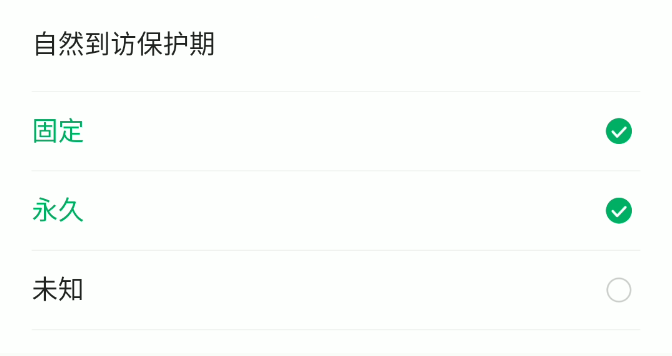 ```dart
BrnMultiChoicePortraitInputFormItem(
title: "自然到访保护期",
options: [
"固定",
"永久",
"未知",
],
value: [
"固定",
"永久",
],
onTip: () {
BrnToast.show("点击触发onTip回调", context);
},
onAddTap: () {
BrnToast.show("点击触发onAddTap回调", context);
},
onRemoveTap: () {
BrnToast.show("点击触发onRemoveTap回调", context);
},
onChanged: (List oldValue, List newValue) {
BrnToast.show(
"点击触发onChanged回调${oldValue.length}_${newValue.length}_onChanged", context);
},
),
```
### 效果2:全功能样式
```dart
BrnMultiChoicePortraitInputFormItem(
title: "自然到访保护期",
options: [
"固定",
"永久",
"未知",
],
value: [
"固定",
"永久",
],
onTip: () {
BrnToast.show("点击触发onTip回调", context);
},
onAddTap: () {
BrnToast.show("点击触发onAddTap回调", context);
},
onRemoveTap: () {
BrnToast.show("点击触发onRemoveTap回调", context);
},
onChanged: (List oldValue, List newValue) {
BrnToast.show(
"点击触发onChanged回调${oldValue.length}_${newValue.length}_onChanged", context);
},
),
```
### 效果2:全功能样式
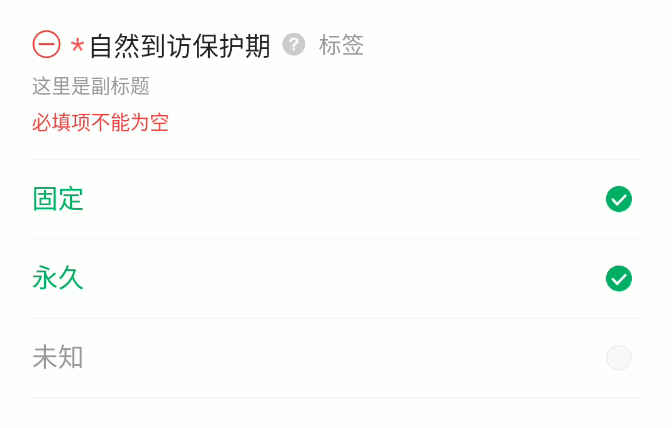 ```dart
BrnMultiChoicePortraitInputFormItem(
prefixIconType: BrnPrefixIconType.remove,
isRequire: true,
error: "必填项不能为空",
title: "自然到访保护期",
subTitle: "这里是副标题",
tipLabel: "标签",
options: [
"固定",
"永久",
"未知",
],
value: [
"固定",
"永久",
],
enableList: [true, true, false],
onTip: () {
BrnToast.show("点击触发onTip回调", context);
},
onAddTap: () {
BrnToast.show("点击触发onAddTap回调", context);
},
onRemoveTap: () {
BrnToast.show("点击触发onRemoveTap回调", context);
},
onChanged: (List oldValue, List newValue) {
BrnToast.show(
"点击触发onChanged回调${oldValue.length}_${newValue.length}_onChanged", context);
},
)
```
```dart
BrnMultiChoicePortraitInputFormItem(
prefixIconType: BrnPrefixIconType.remove,
isRequire: true,
error: "必填项不能为空",
title: "自然到访保护期",
subTitle: "这里是副标题",
tipLabel: "标签",
options: [
"固定",
"永久",
"未知",
],
value: [
"固定",
"永久",
],
enableList: [true, true, false],
onTip: () {
BrnToast.show("点击触发onTip回调", context);
},
onAddTap: () {
BrnToast.show("点击触发onAddTap回调", context);
},
onRemoveTap: () {
BrnToast.show("点击触发onRemoveTap回调", context);
},
onChanged: (List oldValue, List newValue) {
BrnToast.show(
"点击触发onChanged回调${oldValue.length}_${newValue.length}_onChanged", context);
},
)
```