---
title: BrnGuide
group:
title: Guide
order: 17
---
# BrnGuide
通过阻断式的交互弹框,实现新手交互
## 一、效果总览
有强和弱两种交互模式
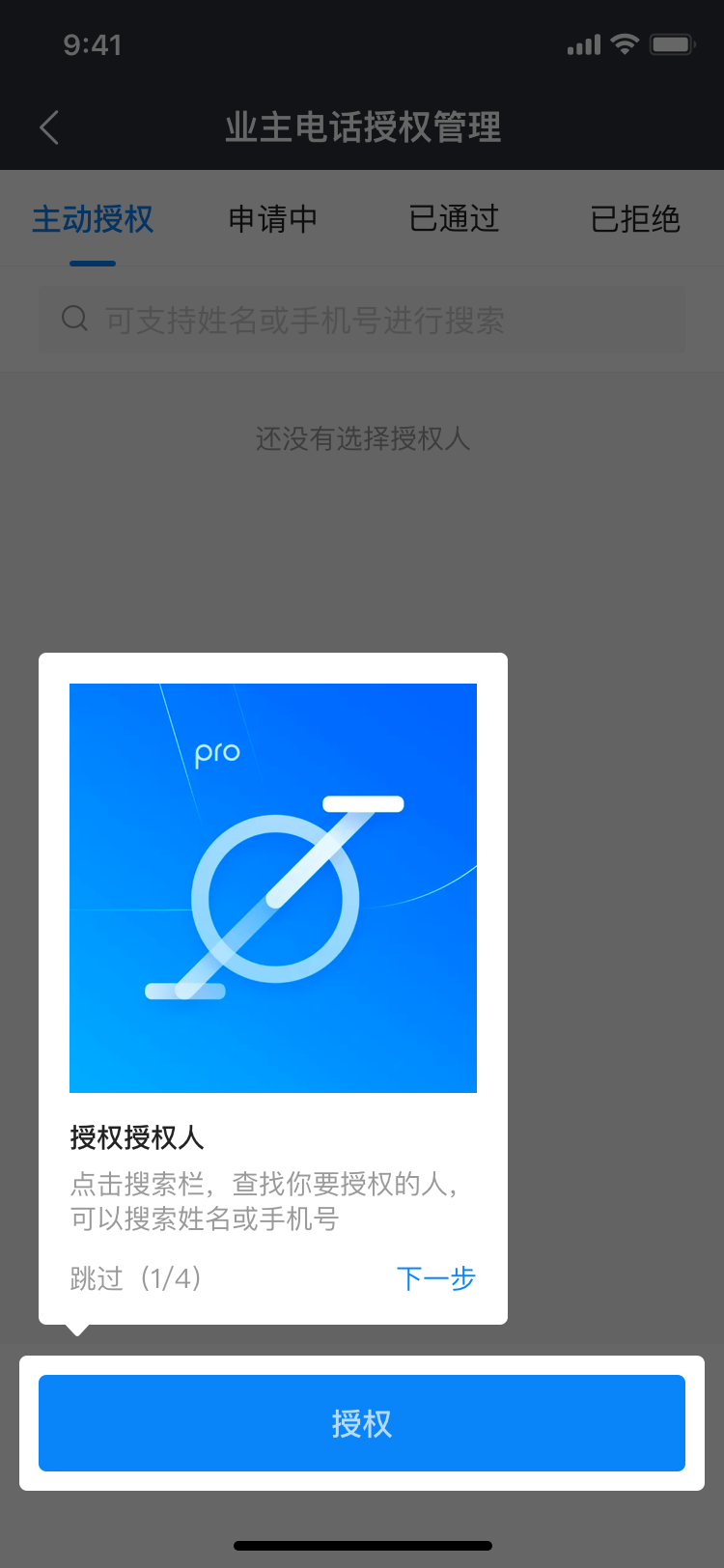
#### 强引导
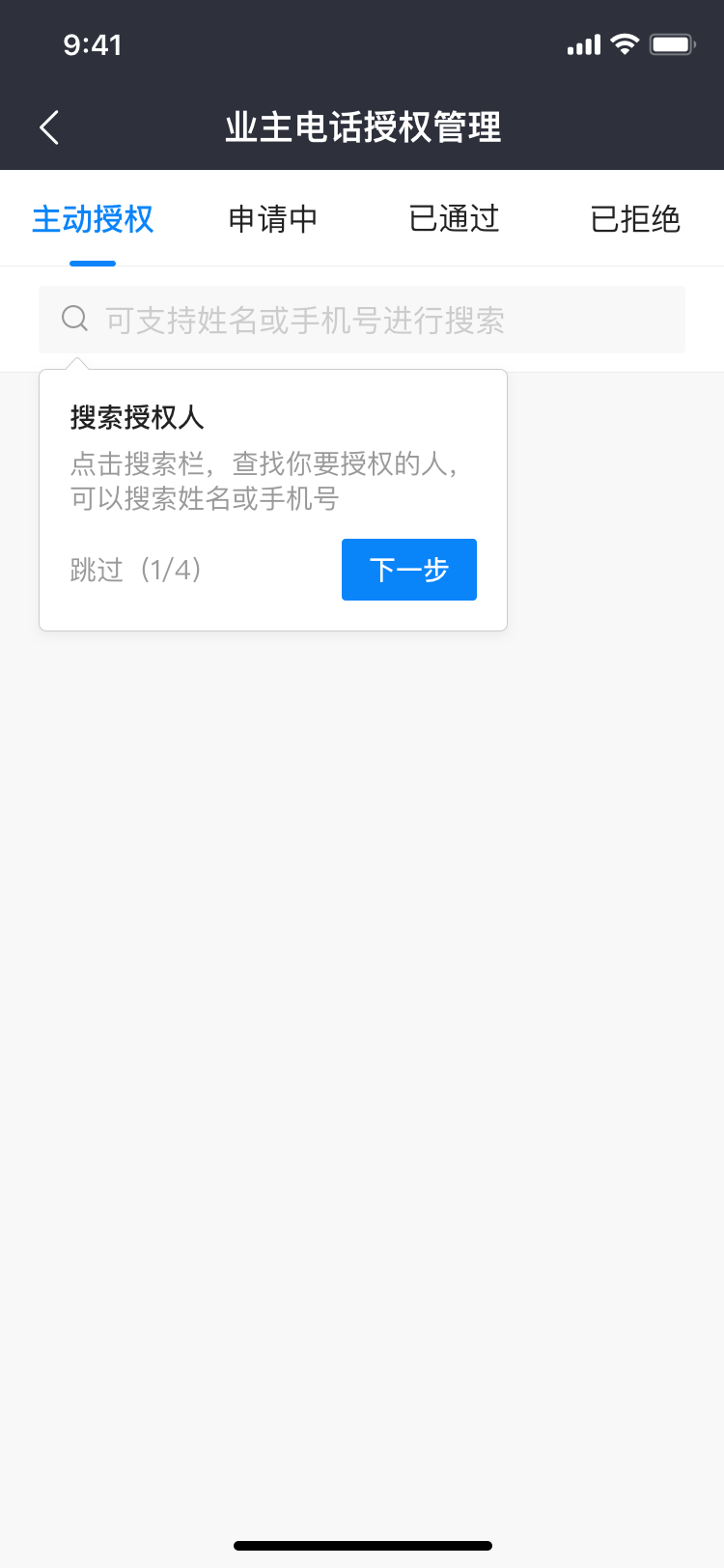
 #### 弱引导
 ## 二、描述
### 适用场景
产品提出需要实现引导类的需求时。
### 交互规则
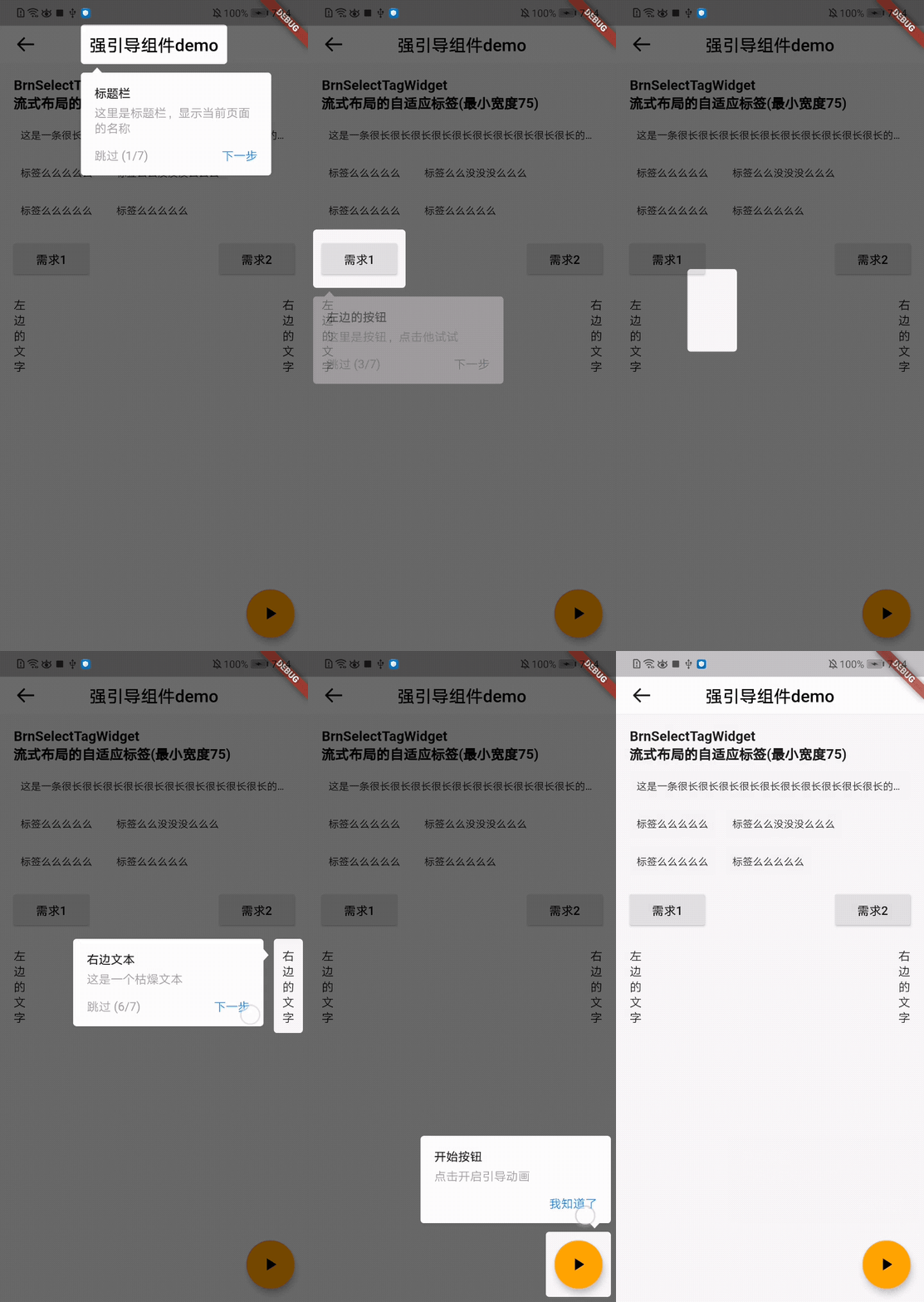
1. 强引导:蒙层覆盖+引导内容
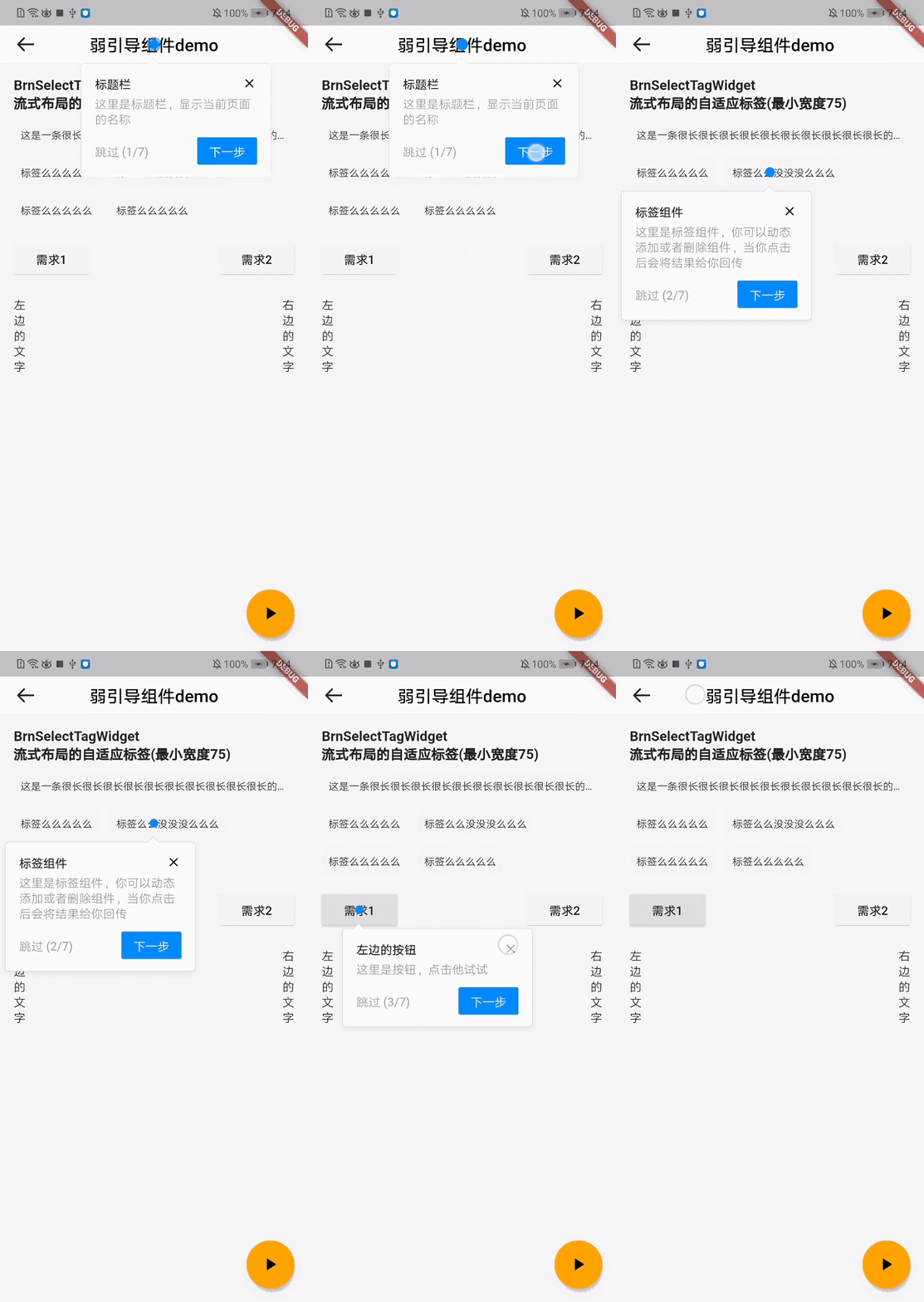
2. 弱引导:引导内容
3. 初始化完 引导视图之后需要通过 key 和要展示引导视图的组件关联起来;然后调用引导视图的 start() 方法展示即可。
## 三、构造函数及参数说明
### 构造函数
```dart
BrnGuide(
{@required this.introMode,
@required this.widgetBuilder,
@required this.stepCount,
this.borderRadius = const BorderRadius.all(Radius.circular(4)),
this.padding = const EdgeInsets.all(10),
this.onNextClick})
: assert(stepCount > 0) {
for (int i = 0; i < stepCount; i++) {
_globalKeys.add(GlobalKey());
_configMap.add({});
}
}
```
### 参数说明
| **参数名** | **参数类型** | **描述** | **是否必填** | **默认值** |
| ------------- | ---------------------------------------- | ---------------------------------------- | ------------ | ------------------------------------ |
| introMode | GuideMode | 引导强弱模式, GuideMode { force, soft } | 是 | 无 |
| widgetBuilder | Widget Function(StepWidgetParams params) | 引导 Widget | 是 | 无 |
| stepCount | int | 步骤数量 | 是 | 无 |
| borderRadius | BorderRadiusGeometry | 强提示下的高亮圆角 | 否 | BorderRadius.all(Radius.circular(4)) |
| padding | EdgeInsets | 高亮组件与目标组件的间距,默认是 10 | 否 | EdgeInsets.all(10) |
| onNextClick | void Function(int nextIndex) | 每次点击的下一步的时候的回调 | 否 | 无 |
### 其他参数说明:StepWidgetBuilder 使用默认配置
```dart
static Widget Function(StepWidgetParams params) useDefaultTheme(
{@required List tipInfo,
String Function(int currentStepIndex, int stepCount) buttonTextBuilder,
bool showStepLabel = true,
bool showSkipLabel = true,
bool showClose = true})
```
| **参数名** | **参数类型** | **描述** | **是否必填** | 默认值 |
| ----------------- | ---------------------------------------------------- | ---------------- | ------------ | ---------------------- |
| tipInfo | `List` | 提示内容 | 是 | 无 |
| buttonTextBuilder | String Function(int currentStepIndex, int stepCount) | 下一步的文案 | 否 | '下一步' 和 '我知道了' |
| showStepLabel | bool | 是否展示步骤标志 | 否 | true |
| showSkipLabel | bool | 是否展示跳过功能 | 否 | true |
| showClose | bool | 是否展示关闭功能 | 否 | true |
## 四、代码演示
### 效果1:强引导模式
## 二、描述
### 适用场景
产品提出需要实现引导类的需求时。
### 交互规则
1. 强引导:蒙层覆盖+引导内容
2. 弱引导:引导内容
3. 初始化完 引导视图之后需要通过 key 和要展示引导视图的组件关联起来;然后调用引导视图的 start() 方法展示即可。
## 三、构造函数及参数说明
### 构造函数
```dart
BrnGuide(
{@required this.introMode,
@required this.widgetBuilder,
@required this.stepCount,
this.borderRadius = const BorderRadius.all(Radius.circular(4)),
this.padding = const EdgeInsets.all(10),
this.onNextClick})
: assert(stepCount > 0) {
for (int i = 0; i < stepCount; i++) {
_globalKeys.add(GlobalKey());
_configMap.add({});
}
}
```
### 参数说明
| **参数名** | **参数类型** | **描述** | **是否必填** | **默认值** |
| ------------- | ---------------------------------------- | ---------------------------------------- | ------------ | ------------------------------------ |
| introMode | GuideMode | 引导强弱模式, GuideMode { force, soft } | 是 | 无 |
| widgetBuilder | Widget Function(StepWidgetParams params) | 引导 Widget | 是 | 无 |
| stepCount | int | 步骤数量 | 是 | 无 |
| borderRadius | BorderRadiusGeometry | 强提示下的高亮圆角 | 否 | BorderRadius.all(Radius.circular(4)) |
| padding | EdgeInsets | 高亮组件与目标组件的间距,默认是 10 | 否 | EdgeInsets.all(10) |
| onNextClick | void Function(int nextIndex) | 每次点击的下一步的时候的回调 | 否 | 无 |
### 其他参数说明:StepWidgetBuilder 使用默认配置
```dart
static Widget Function(StepWidgetParams params) useDefaultTheme(
{@required List tipInfo,
String Function(int currentStepIndex, int stepCount) buttonTextBuilder,
bool showStepLabel = true,
bool showSkipLabel = true,
bool showClose = true})
```
| **参数名** | **参数类型** | **描述** | **是否必填** | 默认值 |
| ----------------- | ---------------------------------------------------- | ---------------- | ------------ | ---------------------- |
| tipInfo | `List` | 提示内容 | 是 | 无 |
| buttonTextBuilder | String Function(int currentStepIndex, int stepCount) | 下一步的文案 | 否 | '下一步' 和 '我知道了' |
| showStepLabel | bool | 是否展示步骤标志 | 否 | true |
| showSkipLabel | bool | 是否展示跳过功能 | 否 | true |
| showClose | bool | 是否展示关闭功能 | 否 | true |
## 四、代码演示
### 效果1:强引导模式
 ```dart
class ForceGuideDemo extends StatefulWidget {
ForceGuideDemo({Key key}) : super(key: key);
@override
_ForceGuideDemoState createState() => _ForceGuideDemoState();
}
class _ForceGuideDemoState extends State {
BrnGuide intro;
_ForceGuideDemoState() {
/// init Guide
intro = BrnGuide(
stepCount: 7,
introMode: GuideMode.force,
/// use defaultTheme, or you can implement widgetBuilder function yourself
widgetBuilder: StepWidgetBuilder.useDefaultTheme(
showClose: false,
tipInfo: [
BrnTipInfoBean("标题栏", "这里是标题栏,显示当前页面的名称", ""),
BrnTipInfoBean("标签组件", "这里是标签组件,你可以动态添加或者删除组件,当你点击后会将结果给你回传", ""),
BrnTipInfoBean("左边的按钮", "这里是按钮,点击他试试", ''),
BrnTipInfoBean("右边的按钮", "这里是按钮,点击他试试", ''),
BrnTipInfoBean("左边的文本 ", "这是一个朴实无华的文本", ''),
BrnTipInfoBean("右边文本 ", "这是一个枯燥文本", ""),
BrnTipInfoBean("开始按钮 ", "点击开启引导动画", ''),
],
),
);
}
List nameList = [
'这是一条很长很长很长很长很长很长很长很长很长很长的标签',
'标签么么么么么',
'标签么么没没没么么么',
'标签么么么么么',
'标签么么么么么'
];
@override
void initState() {
super.initState();
Timer(Duration(microseconds: 0), () {
/// start the intro
intro.start(context);
});
}
Widget build(BuildContext context) {
return WillPopScope(
child: Scaffold(
appBar: BrnAppBar(
brightness: Brightness.light,
title: Text(
'强引导组件demo',
key: intro.keys[0],
style: TextStyle(color: Colors.black),
),
),
body: SingleChildScrollView(
child: Container(
padding: EdgeInsets.all(16),
child: Column(
crossAxisAlignment: CrossAxisAlignment.start,
children: [
Text(
'BrnSelectTagWidget',
style: TextStyle(fontSize: 16, fontWeight: FontWeight.bold),
),
Text(
'流式布局的自适应标签(最小宽度75)',
style: TextStyle(fontSize: 16, fontWeight: FontWeight.bold),
),
SizedBox(
height: 10,
),
BrnSelectTag(
key: intro.keys[1],
tagNameList: nameList,
tagWidth: (MediaQuery.of(context).size.width - 40 - 24) / 3,
fixWidthMode: false,
onSelect: (index) {
BrnToast.show("$index is selected", context);
}),
SizedBox(
height: 16,
),
Row(
mainAxisAlignment: MainAxisAlignment.spaceBetween,
children: [
RaisedButton(
key: intro.keys[2],
onPressed: () {},
child: Text("需求1"),
),
RaisedButton(
key: intro.keys[3],
onPressed: () {},
child: Text("需求2"),
),
],
),
Row(
mainAxisAlignment: MainAxisAlignment.spaceBetween,
children: [
Container(
width: 14,
padding: EdgeInsets.only(top: 20),
alignment: Alignment.center,
child: Text(
'左边的文字',
key: intro.keys[4],
),
),
Container(
width: 14,
padding: EdgeInsets.only(top: 20),
alignment: Alignment.center,
child: Text(
'右边的文字',
key: intro.keys[5],
),
)
],
),
SizedBox(
height: 16,
),
],
),
),
),
floatingActionButton: FloatingActionButton(
key: intro.keys[6],
/// 1st guide
child: Icon(
Icons.play_arrow,
),
onPressed: () {
intro.start(context);
},
),
),
onWillPop: () async {
// destroy guide page when tap back key
intro.dispose();
return true;
},
);
}
}
```
### 效果2:弱引导模式
```dart
class ForceGuideDemo extends StatefulWidget {
ForceGuideDemo({Key key}) : super(key: key);
@override
_ForceGuideDemoState createState() => _ForceGuideDemoState();
}
class _ForceGuideDemoState extends State {
BrnGuide intro;
_ForceGuideDemoState() {
/// init Guide
intro = BrnGuide(
stepCount: 7,
introMode: GuideMode.force,
/// use defaultTheme, or you can implement widgetBuilder function yourself
widgetBuilder: StepWidgetBuilder.useDefaultTheme(
showClose: false,
tipInfo: [
BrnTipInfoBean("标题栏", "这里是标题栏,显示当前页面的名称", ""),
BrnTipInfoBean("标签组件", "这里是标签组件,你可以动态添加或者删除组件,当你点击后会将结果给你回传", ""),
BrnTipInfoBean("左边的按钮", "这里是按钮,点击他试试", ''),
BrnTipInfoBean("右边的按钮", "这里是按钮,点击他试试", ''),
BrnTipInfoBean("左边的文本 ", "这是一个朴实无华的文本", ''),
BrnTipInfoBean("右边文本 ", "这是一个枯燥文本", ""),
BrnTipInfoBean("开始按钮 ", "点击开启引导动画", ''),
],
),
);
}
List nameList = [
'这是一条很长很长很长很长很长很长很长很长很长很长的标签',
'标签么么么么么',
'标签么么没没没么么么',
'标签么么么么么',
'标签么么么么么'
];
@override
void initState() {
super.initState();
Timer(Duration(microseconds: 0), () {
/// start the intro
intro.start(context);
});
}
Widget build(BuildContext context) {
return WillPopScope(
child: Scaffold(
appBar: BrnAppBar(
brightness: Brightness.light,
title: Text(
'强引导组件demo',
key: intro.keys[0],
style: TextStyle(color: Colors.black),
),
),
body: SingleChildScrollView(
child: Container(
padding: EdgeInsets.all(16),
child: Column(
crossAxisAlignment: CrossAxisAlignment.start,
children: [
Text(
'BrnSelectTagWidget',
style: TextStyle(fontSize: 16, fontWeight: FontWeight.bold),
),
Text(
'流式布局的自适应标签(最小宽度75)',
style: TextStyle(fontSize: 16, fontWeight: FontWeight.bold),
),
SizedBox(
height: 10,
),
BrnSelectTag(
key: intro.keys[1],
tagNameList: nameList,
tagWidth: (MediaQuery.of(context).size.width - 40 - 24) / 3,
fixWidthMode: false,
onSelect: (index) {
BrnToast.show("$index is selected", context);
}),
SizedBox(
height: 16,
),
Row(
mainAxisAlignment: MainAxisAlignment.spaceBetween,
children: [
RaisedButton(
key: intro.keys[2],
onPressed: () {},
child: Text("需求1"),
),
RaisedButton(
key: intro.keys[3],
onPressed: () {},
child: Text("需求2"),
),
],
),
Row(
mainAxisAlignment: MainAxisAlignment.spaceBetween,
children: [
Container(
width: 14,
padding: EdgeInsets.only(top: 20),
alignment: Alignment.center,
child: Text(
'左边的文字',
key: intro.keys[4],
),
),
Container(
width: 14,
padding: EdgeInsets.only(top: 20),
alignment: Alignment.center,
child: Text(
'右边的文字',
key: intro.keys[5],
),
)
],
),
SizedBox(
height: 16,
),
],
),
),
),
floatingActionButton: FloatingActionButton(
key: intro.keys[6],
/// 1st guide
child: Icon(
Icons.play_arrow,
),
onPressed: () {
intro.start(context);
},
),
),
onWillPop: () async {
// destroy guide page when tap back key
intro.dispose();
return true;
},
);
}
}
```
### 效果2:弱引导模式
 ```dart
class SoftGuideDemo extends StatefulWidget {
SoftGuideDemo({Key key}) : super(key: key);
@override
_SoftGuideDemoState createState() => _SoftGuideDemoState();
}
class _SoftGuideDemoState extends State {
BrnGuide intro;
_SoftGuideDemoState() {
/// init Guide
intro = BrnGuide(
stepCount: 7,
introMode: GuideMode.soft,
/// use defaultTheme, or you can implement widgetBuilder function yourself
widgetBuilder: StepWidgetBuilder.useDefaultTheme(
tipInfo: [
BrnTipInfoBean("标题栏", "这里是标题栏,显示当前页面的名称", ""),
BrnTipInfoBean("标签组件", "这里是标签组件,你可以动态添加或者删除组件,当你点击后会将结果给你回传", ""),
BrnTipInfoBean("左边的按钮", "这里是按钮,点击他试试", ""),
BrnTipInfoBean("右边的按钮", "这里是按钮,点击他试试", ""),
BrnTipInfoBean("左边的文本 ", "这是一个朴实无华的文本", ""),
BrnTipInfoBean("右边文本 ", "这是一个枯燥文本", ""),
BrnTipInfoBean("开始按钮 ", "点击开启引导动画", ""),
],
),
);
}
List nameList = [
'这是一条很长很长很长很长很长很长很长很长很长很长的标签',
'标签么么么么么',
'标签么么没没没么么么',
'标签么么么么么',
'标签么么么么么'
];
@override
void initState() {
super.initState();
Timer(Duration(microseconds: 0), () {
/// start the intro
intro.start(context);
});
}
Widget build(BuildContext context) {
return WillPopScope(
child: Scaffold(
appBar: BrnAppBar(
brightness: Brightness.light,
title: Text(
'弱引导组件demo',
key: intro.keys[0],
style: TextStyle(color: Colors.black),
),
),
body: SingleChildScrollView(
child: Container(
padding: EdgeInsets.all(16),
child: Column(
crossAxisAlignment: CrossAxisAlignment.start,
children: [
Text(
'BrnSelectTagWidget',
style: TextStyle(fontSize: 16, fontWeight: FontWeight.bold),
),
Text(
'流式布局的自适应标签(最小宽度75)',
style: TextStyle(fontSize: 16, fontWeight: FontWeight.bold),
),
SizedBox(
height: 10,
),
BrnSelectTag(
key: intro.keys[1],
tagNameList: nameList,
tagWidth: (MediaQuery.of(context).size.width - 40 - 24) / 3,
fixWidthMode: false,
onSelect: (index) {
BrnToast.show("$index is selected", context);
}),
SizedBox(
height: 16,
),
Row(
mainAxisAlignment: MainAxisAlignment.spaceBetween,
children: [
RaisedButton(
key: intro.keys[2],
onPressed: () {},
child: Text("需求1"),
),
RaisedButton(
key: intro.keys[3],
onPressed: () {},
child: Text("需求2"),
),
],
),
Row(
mainAxisAlignment: MainAxisAlignment.spaceBetween,
children: [
Container(
width: 14,
padding: EdgeInsets.only(top: 20),
alignment: Alignment.center,
child: Text(
'左边的文字',
key: intro.keys[4],
),
),
Container(
width: 14,
padding: EdgeInsets.only(top: 20),
alignment: Alignment.center,
child: Text(
'右边的文字',
key: intro.keys[5],
),
)
],
),
SizedBox(
height: 16,
),
],
),
),
),
floatingActionButton: FloatingActionButton(
key: intro.keys[6],
/// 1st guide
child: Icon(
Icons.play_arrow,
),
onPressed: () {
intro.start(context);
},
),
),
onWillPop: () async {
// destroy guide page when tap back key
intro.dispose();
return true;
},
);
}
}
```
```dart
class SoftGuideDemo extends StatefulWidget {
SoftGuideDemo({Key key}) : super(key: key);
@override
_SoftGuideDemoState createState() => _SoftGuideDemoState();
}
class _SoftGuideDemoState extends State {
BrnGuide intro;
_SoftGuideDemoState() {
/// init Guide
intro = BrnGuide(
stepCount: 7,
introMode: GuideMode.soft,
/// use defaultTheme, or you can implement widgetBuilder function yourself
widgetBuilder: StepWidgetBuilder.useDefaultTheme(
tipInfo: [
BrnTipInfoBean("标题栏", "这里是标题栏,显示当前页面的名称", ""),
BrnTipInfoBean("标签组件", "这里是标签组件,你可以动态添加或者删除组件,当你点击后会将结果给你回传", ""),
BrnTipInfoBean("左边的按钮", "这里是按钮,点击他试试", ""),
BrnTipInfoBean("右边的按钮", "这里是按钮,点击他试试", ""),
BrnTipInfoBean("左边的文本 ", "这是一个朴实无华的文本", ""),
BrnTipInfoBean("右边文本 ", "这是一个枯燥文本", ""),
BrnTipInfoBean("开始按钮 ", "点击开启引导动画", ""),
],
),
);
}
List nameList = [
'这是一条很长很长很长很长很长很长很长很长很长很长的标签',
'标签么么么么么',
'标签么么没没没么么么',
'标签么么么么么',
'标签么么么么么'
];
@override
void initState() {
super.initState();
Timer(Duration(microseconds: 0), () {
/// start the intro
intro.start(context);
});
}
Widget build(BuildContext context) {
return WillPopScope(
child: Scaffold(
appBar: BrnAppBar(
brightness: Brightness.light,
title: Text(
'弱引导组件demo',
key: intro.keys[0],
style: TextStyle(color: Colors.black),
),
),
body: SingleChildScrollView(
child: Container(
padding: EdgeInsets.all(16),
child: Column(
crossAxisAlignment: CrossAxisAlignment.start,
children: [
Text(
'BrnSelectTagWidget',
style: TextStyle(fontSize: 16, fontWeight: FontWeight.bold),
),
Text(
'流式布局的自适应标签(最小宽度75)',
style: TextStyle(fontSize: 16, fontWeight: FontWeight.bold),
),
SizedBox(
height: 10,
),
BrnSelectTag(
key: intro.keys[1],
tagNameList: nameList,
tagWidth: (MediaQuery.of(context).size.width - 40 - 24) / 3,
fixWidthMode: false,
onSelect: (index) {
BrnToast.show("$index is selected", context);
}),
SizedBox(
height: 16,
),
Row(
mainAxisAlignment: MainAxisAlignment.spaceBetween,
children: [
RaisedButton(
key: intro.keys[2],
onPressed: () {},
child: Text("需求1"),
),
RaisedButton(
key: intro.keys[3],
onPressed: () {},
child: Text("需求2"),
),
],
),
Row(
mainAxisAlignment: MainAxisAlignment.spaceBetween,
children: [
Container(
width: 14,
padding: EdgeInsets.only(top: 20),
alignment: Alignment.center,
child: Text(
'左边的文字',
key: intro.keys[4],
),
),
Container(
width: 14,
padding: EdgeInsets.only(top: 20),
alignment: Alignment.center,
child: Text(
'右边的文字',
key: intro.keys[5],
),
)
],
),
SizedBox(
height: 16,
),
],
),
),
),
floatingActionButton: FloatingActionButton(
key: intro.keys[6],
/// 1st guide
child: Icon(
Icons.play_arrow,
),
onPressed: () {
intro.start(context);
},
),
),
onWillPop: () async {
// destroy guide page when tap back key
intro.dispose();
return true;
},
);
}
}
```