---
title: BrnIconButton
group:
title: Button
order: 5
---
# BrnIconButton
## 一、效果总览
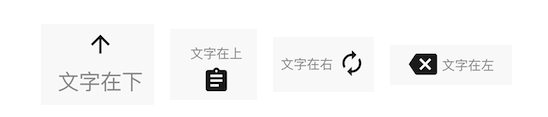 ## 二、描述
### 适用场景
1、支持图片和文字任意组合
2、支持文字和图片之间间距调整
3、支持点击和置灰状态
## 三、构造函数及参数说明
### 构造函数
``` dart
const BrnIconButton({
Key? key,
required this.name,
this.iconWidget,
this.onTap,
this.iconWidth = 24,
this.iconHeight = 24,
@Deprecated('该字段废弃,请使用 style ,未来版本会删除该字段')
this.fontSize = 11,
this.widgetWidth = 80,
this.widgetHeight = 80,
this.direction = Direction.top,
this.padding = 4,
this.style,
this.mainAxisAlignment = MainAxisAlignment.center,
}): super(key: key);
```
### 参数说明
| 参数名 | 参数类型 | 描述 | 是否必填 | 默认值 |
| ---------------------------- | -------------------------------------------- | ------------------------------------------------------------ | -------- | ------------------------------------------------------------ |
| name | String | 图文组合文字的名称 | 否 | 空 |
| iconWidget | Widget? | 图文组合需要展示的图片/可以是置灰的图片 | 否 | 空 |
| onTap | VoidCallback? | 点击的回调 | 否 | 空 |
| direction | enum Direction { left, right, top, bottom, } | 文字相对于图片的位置。 bottom:文字在下 icon 在上, top:文字在上 icon 在下 ,left:文字在左 icon 在右,right:文字在右 icon 在左 | 否 | top |
| iconWidth | double | 图片的宽度 | 否 | 24 |
| iconHeight | Color | 图片的高度 | 否 | 24 |
| widgetWidth | double | 图文组合的宽度 | 否 | 80 |
| widgetHeight | double | 图文组合的高度 | 否 | 80 |
| padding | double | 文字和图片的间距 | 否 | 4 |
| style | TextStyle? | 文字样式 | 否 | TextStyle( fontSize: 11, color: BrunoColor.instance.F2Color, ), |
| **@Deprecated**
## 二、描述
### 适用场景
1、支持图片和文字任意组合
2、支持文字和图片之间间距调整
3、支持点击和置灰状态
## 三、构造函数及参数说明
### 构造函数
``` dart
const BrnIconButton({
Key? key,
required this.name,
this.iconWidget,
this.onTap,
this.iconWidth = 24,
this.iconHeight = 24,
@Deprecated('该字段废弃,请使用 style ,未来版本会删除该字段')
this.fontSize = 11,
this.widgetWidth = 80,
this.widgetHeight = 80,
this.direction = Direction.top,
this.padding = 4,
this.style,
this.mainAxisAlignment = MainAxisAlignment.center,
}): super(key: key);
```
### 参数说明
| 参数名 | 参数类型 | 描述 | 是否必填 | 默认值 |
| ---------------------------- | -------------------------------------------- | ------------------------------------------------------------ | -------- | ------------------------------------------------------------ |
| name | String | 图文组合文字的名称 | 否 | 空 |
| iconWidget | Widget? | 图文组合需要展示的图片/可以是置灰的图片 | 否 | 空 |
| onTap | VoidCallback? | 点击的回调 | 否 | 空 |
| direction | enum Direction { left, right, top, bottom, } | 文字相对于图片的位置。 bottom:文字在下 icon 在上, top:文字在上 icon 在下 ,left:文字在左 icon 在右,right:文字在右 icon 在左 | 否 | top |
| iconWidth | double | 图片的宽度 | 否 | 24 |
| iconHeight | Color | 图片的高度 | 否 | 24 |
| widgetWidth | double | 图文组合的宽度 | 否 | 80 |
| widgetHeight | double | 图文组合的高度 | 否 | 80 |
| padding | double | 文字和图片的间距 | 否 | 4 |
| style | TextStyle? | 文字样式 | 否 | TextStyle( fontSize: 11, color: BrunoColor.instance.F2Color, ), |
| **@Deprecated**
fontSize | double | 文字字体大小
**Deprecated 该字段废弃,请使用 style ,未来版本会删除该字段** | 否 | 11 |
| mainAxisAlignment | MainAxisAlignment | 图文对齐方式 | 否 | MainAxisAlignment.center |
## 四、代码演示
### 效果1

``` dart
Widget iconButton(){
return Column(
children: [
Padding(
padding: EdgeInsets.only(top: 50, bottom: 50),
child: Center(
child: BrnIconButton(
name: '文字在下',
style: TextStyle(
fontSize: 18,
color: BrunoColor.instance.F2Color,
),
direction: Direction.bottom,
padding: 4,
iconHeight: 30,
iconWidth: 30,
iconWidget: Icon(Icons.arrow_upward),
onTap: () {
BrnToast.show('按钮被点击', context);
}),
),
),
Padding(
padding: EdgeInsets.only(top: 10, bottom: 50),
child: Center(
child: BrnIconButton(
name: '文字在上',
direction: Direction.top,
padding: 4,
iconWidget: Icon(Icons.assignment),
onTap: () {
BrnToast.show('按钮被点击', context);
}),
),
),
Padding(
padding: EdgeInsets.only(top: 10, bottom: 50),
child: Center(
child: BrnIconButton(
name: '文字在右',
direction: Direction.right,
padding: 4,
iconWidget: Icon(Icons.autorenew),
onTap: () {
BrnToast.show('按钮被点击', context);
}),
),
),
Padding(
padding: EdgeInsets.only(top: 10, bottom: 50),
child: Center(
child: BrnIconButton(
name: '文字在左',
direction: Direction.left,
padding: 4,
iconWidget: Icon(Icons.backspace),
onTap: () {
BrnToast.show('按钮被点击', context);
}),
),
)
],
);
}
```