---
title: BrnSearchText
group:
title: SugSearch
order: 30
---
# BrnSearchText
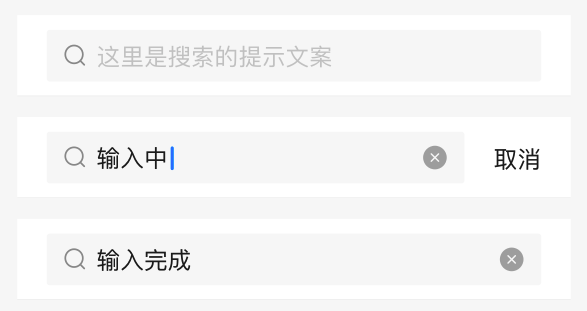
搜索框,用于输入文本进行搜索。
## 一、效果总览
## 二、描述
### 使用场景
通用的搜索框。
1. Appbar 为搜索框的情况;
2. 页面顶部存在搜索的情况;
3. 或 页面内存在搜索的情况。
### 交互规则
1. 获得焦点的时候取消会展示,默认不展示。
2. 当有文字的时候,删除按钮可展示,删除按钮的点击事件为清空输入项。
## 三、构造函数及参数说明
### 构造函数
```dart
const BrnSearchText({
Key? key,
this.searchController,
this.controller,
this.maxLines = 1,
this.maxLength,
this.hintText,
this.hintStyle,
this.textStyle,
this.prefixIcon,
this.onTextChange,
this.onTextCommit,
this.onTextClear,
this.onActionTap,
this.action,
this.maxHeight = 60,
this.innerPadding =
const EdgeInsets.only(top: 10, bottom: 10, left: 20, right: 20),
this.outSideColor = Colors.white,
this.innerColor = const Color(0xfff8f8f8),
this.normalBorder,
this.activeBorder,
this.borderRadius = const BorderRadius.all(const Radius.circular(6.0)),
this.focusNode,
this.autoFocus = false,
this.textInputAction,
this.inputFormatters,
this.textInputType,
}) : super(key: key);
```
### 参数说明
| **参数名** | **参数类型** | **作用** | **是否必填** | **默认值** |
| --- | --- | --- | --- | --- |
| searchController | BrnSearchTextController? | 用于控制 clear Icon 和右侧 Action 的显示与隐藏。等其他复杂的操作。 | 否 | 无 |
| controller | TextEditingController? | 控制输入框行为和相应监听 | 否 | 无 |
| maxLines | int | 允许输入的最大行数 | 否 | 1 |
| maxLength | int? | 允许输入的最大长度 | 否 | 无 |
| hintText | String? | 输入提示语,默认为"请输入搜索内容" | 否 | "请输入搜索内容" |
| hintStyle | TextStyle? | 输入提示语的样式 | 否 | TextStyle(fontSize: 16,height: 1, textBaseline: TextBaseline.alphabetic,color: Color(0xff999999),) |
| textStyle | TextStyle? | 输入文本的样式 | 否 | TextStyle(textBaseline: TextBaseline.alphabetic,color: BrunoColor.instance.F0Color, fontSize: 16) |
| prefixIcon | Widget? | 输入框前置的图标 | 否 | 默认为搜索图标 |
| onTextChange | `BrnOnSearchTextChange=void Function(String content)?` | 搜索框输入内容改变时候的回调函数,str为输入内容 | 否 | 无 |
| onTextCommit | `BrnOnCommit=void Function(String content)?` | 输入内容点击搜索后的回调,content为输入内容 | 否 | 无 |
| onTextClear | `BrnOnTextClear = bool Function()?` | 拦截取消的事件。
1、返回值为true,表明用户想要拦截,则不会走默认的清除行为
2、如果返回值为false,表明用户不想要拦截,在执行了用户的行为之后,还会走默认的行为 | 否 | 无 |
| onActionTap | VoidCallback? | 右侧 action 区域点击的回调 | 否 | 无 |
| action | widget? | 右侧操作 widget | 否 | 无 |
| maxHeight | double | 搜索框的最大高 | 否 | 60 |
| innerPadding | EdgeInsets | 文本内容与边框的边距,设置该字段会导致显示区域变小。 | 否 | EdgeInsets.only(top: 10, bottom: 10, left: 20, right: 20) |
| outSideColor | Color | 包裹搜索框的容器背景色 | 否 | 白色 |
| innerColor | Color | 搜索框内部的颜色 | 否 | Color(0xfff8f8f8) |
| normalBorder | BoxBorder? | 一般状态边框 | 否 | Border.all(width: 1.0, color: widget.innerColor) |
| activeBorder | BoxBorder? | 激活状态边框 | 否 | Border.all(width: 1.0, color: widget.innerColor) |
| borderRadius | BorderRadius | 边框圆角 | 否 | BorderRadius.all(const Radius.circular(6.0)) |
| focusNode | FocusNode? | 管理焦点 | 否 | 无 |
| autofocus | bool | 是否自动获取焦点 | 否 | false |
| textInputAction | TextInputAction? | 用于控制键盘动作 | 否 | 无 |
| inputFormatters | List\? | 过滤输入内容 | 否 | 无 |
| textInputType | TextInputType? | 输入类型 | 否 | 无 |
## 四、代码演示
### 效果1: 点击取消失去焦点
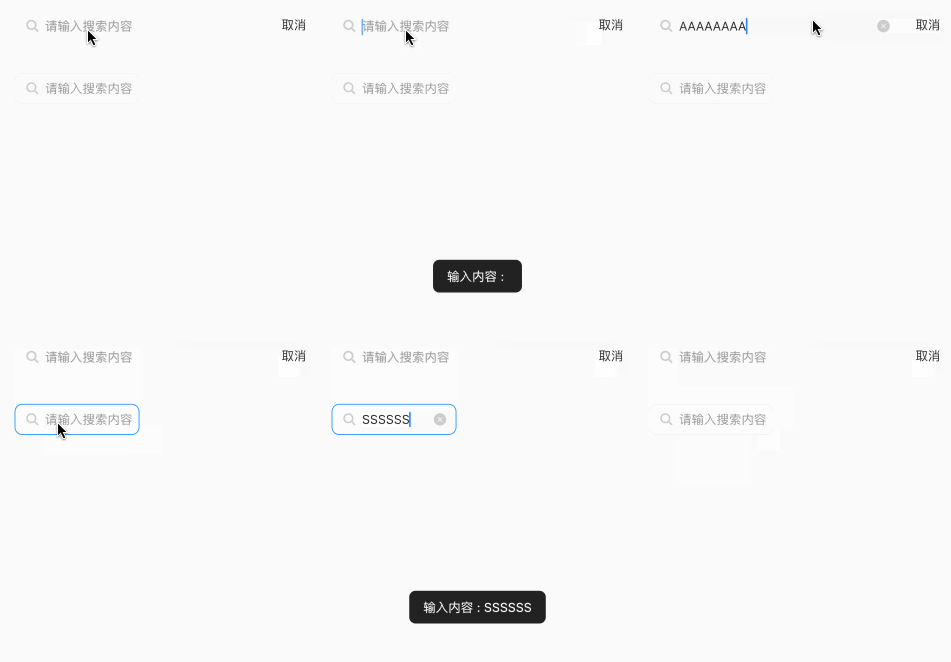
只有点击清除 icon 才会清除内容
```dart
BrnSearchTextController searchController = BrnSearchTextController();
TextEditingController textController = TextEditingController();
///initState 中添加监听,记得销毁
textController.addListener((){
if(focusNode.hasFocus){
if(!isEmpty(textController.text)) {
searchController.isClearShow = true;
searchController.isActionShow = true;
}
}
});
focusNode.addListener((){
if(focusNode.hasFocus){
if(!isEmpty(textController.text)) {
searchController.isClearShow = true;
}
}
});
BrnSearchText(
focusNode: focusNode,
controller: textController,
searchController: scontroller..isActionShow = true,
onTextClear: () {
return false;
},
autoFocus: true,
onActionTap: () {
scontroller.isClearShow = false;
scontroller.isActionShow = false;
focusNode.unfocus();
BrnToast.show('取消', context);
},
onTextCommit: (text) {
BrnToast.show('提交内容 : $text', context);
},
onTextChange: (text) {
BrnToast.show('输入内容 : $text', context);
},
)
```
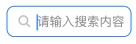
### 效果2: 自定义Search 的边框颜色
```dart
Container(
width: 200,
child: BrnSearchText(
innerPadding: EdgeInsets.only(left: 20, right: 20, top: 10, bottom: 10),
maxHeight: 60,
innerColor: Colors.white,
borderRadius: BorderRadius.all(Radius.circular(10)),
normalBorder:
Border.all(color: Color(0xFFF0F0F0), width: 1, style: BorderStyle.solid),
activeBorder:
Border.all(color: Color(0xFF0984F9), width: 1, style: BorderStyle.solid),
onTextClear: () {
focusNode.unfocus();
return false;
},
autoFocus: true,
action: Container(),
onActionTap: () {
BrnToast.show('取消', context);
},
onTextCommit: (text) {
BrnToast.show('提交内容 : $text', context);
},
onTextChange: (text) {
BrnToast.show('输入内容 : $text', context);
},
),
)
```