---
title: BrnSelectionView
group:
title: Selection
order: 28
---
# BrnSelectionView
用于筛选数据
相关组件 [BrnFlatSelectionWidget](../widgets/brn-flat-selection)
相关组件 [BrnSimpleSelection](../widgets/brn-simple-selection)
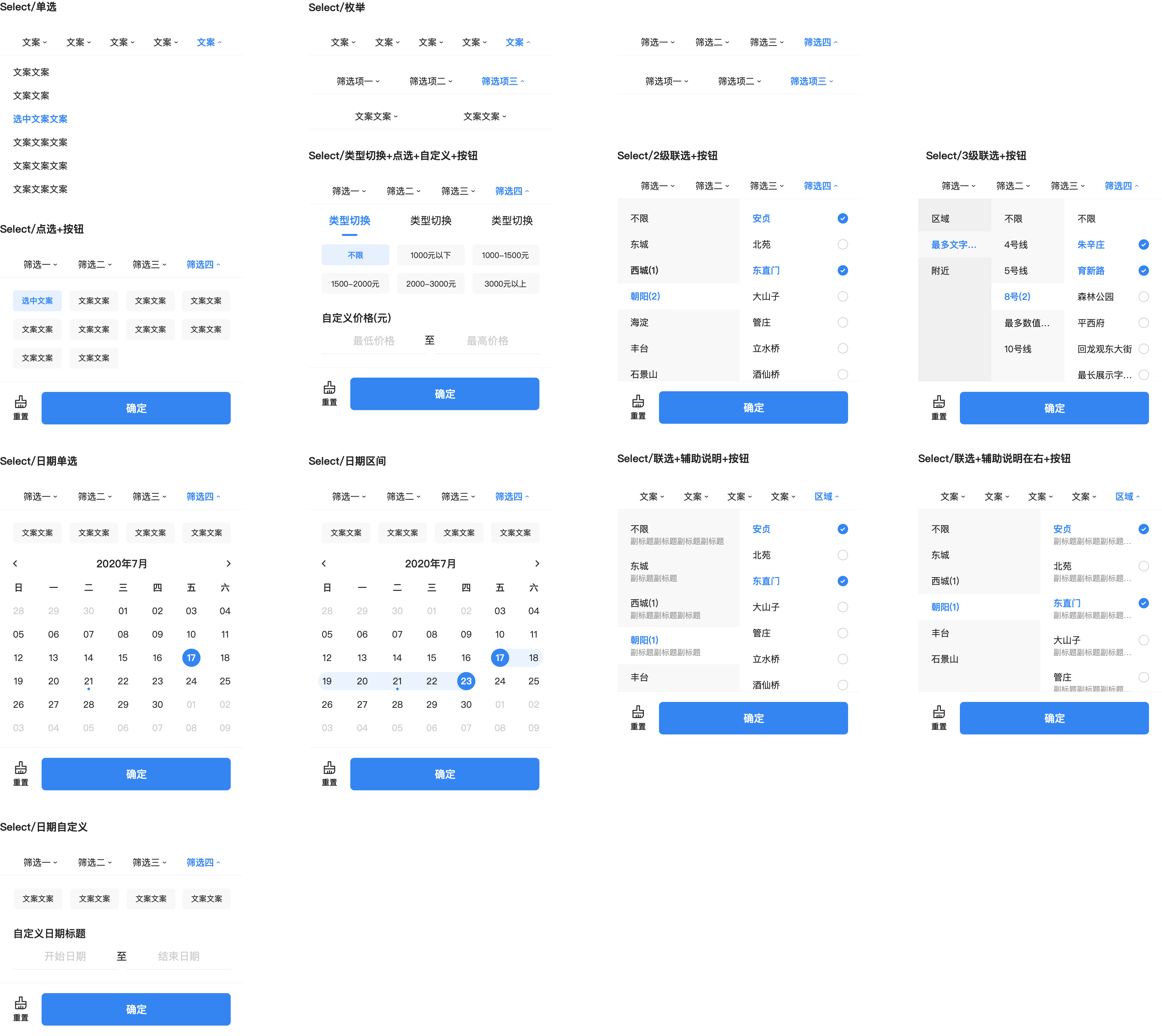
## 一、效果总览
## 二、组件描述
### 适用场景
筛选组件包括下面几种类型,可用在多种场景:
- 列表筛选型,单列表筛选、双列表筛选、三列表筛选
- 标签筛选型,无 Tab 标签类型、多 Tab 标签类型
- 时间筛选型,时间点选择,时间范围选择类型
### 交互规则
- 筛选数据交互分为单选(时间点)、多选(时间范围)两种方式
- 在两列、三列、多 Tab 情况下,当同一层级同时配置了单选类型选项( radio) 和多选类型选项( checkbox)的筛选项时:
1. 当选中了单选(radio)类型的选项时,会将**同一级别的其他筛选项**,以及**他们的子选项**状态置为**未选中**。
2. 当选中了多选(checkbox)类型的选项时,会将**同一级别的单选类型筛选项(radio)**, 以及**他们的子筛选项**状态置为**未选中**。
3. 当选中不限(UnLimit)类型的选项时,会将**同一级别的其它筛选项**、以及同级别的子筛选项状态都会置为**未选中**。
### 注意事项
- 如果需要异步请求筛选数据或组装筛选数据 Entity,刷新筛选组件数据,需要在根结点 entity 中做 configChild() 操作;
- 如果需要在回调中变更 entity 对应的筛选项数据,需要调用 entity.configChild() 方法。来重新构建筛选结点树。 例如:ConfigRowCountFunction、BrnCustomSelectionActionHandle、JoinTitleActionHandle、BrnOnWindowPreShow 等回调方法。
- 最顶层的筛选节点 type 需要有类型(单选 radio、多选 checkbox),不能为空
- 数据结构中的 key 字段必须设置,如果结点中没有 key 。
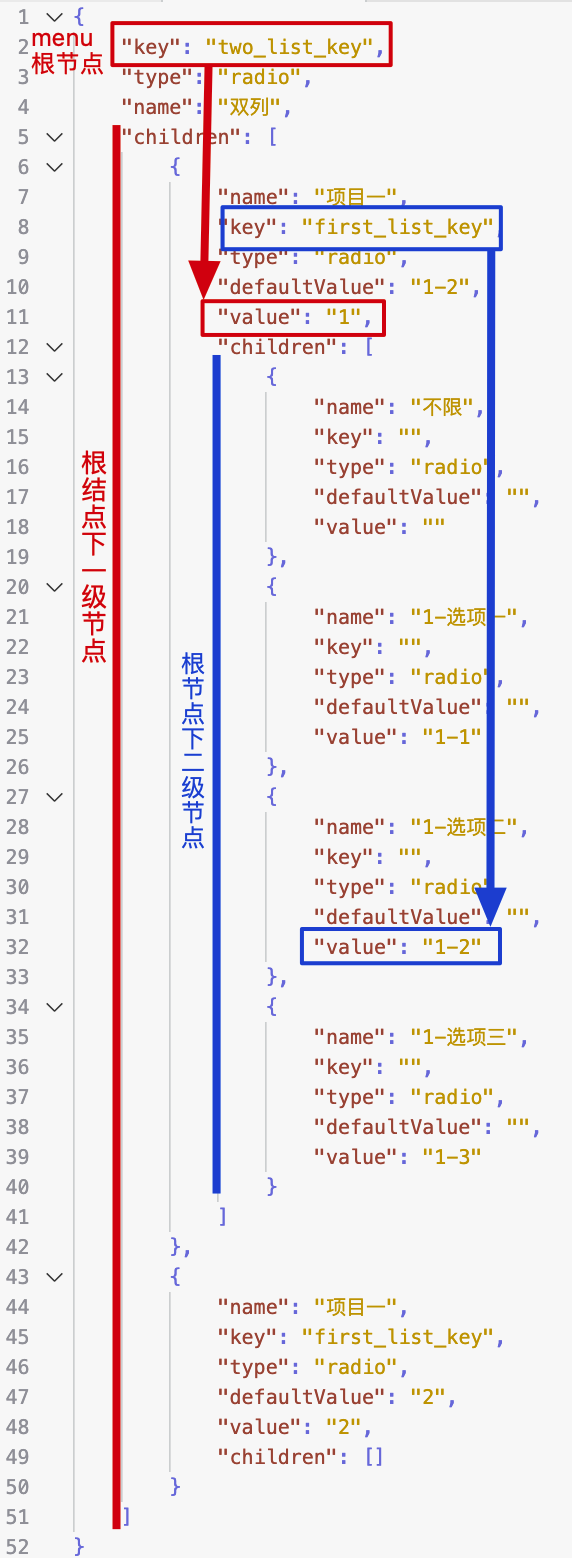
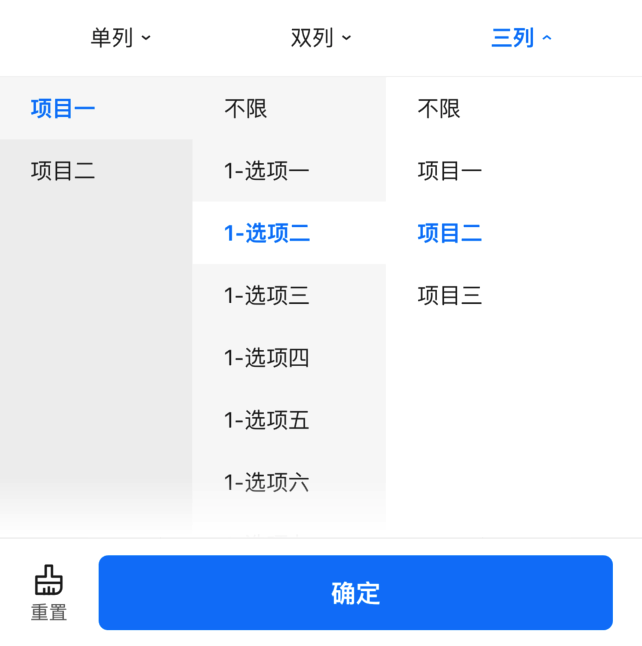
- 筛选数据各结构中,所有筛选项的【 key】 对应的 value 值从其子筛选中获取,如下图所示,最终获取的筛选参数是
```json
{
"two_list_key": "1",
"first_list_key": "1-2"
}
```
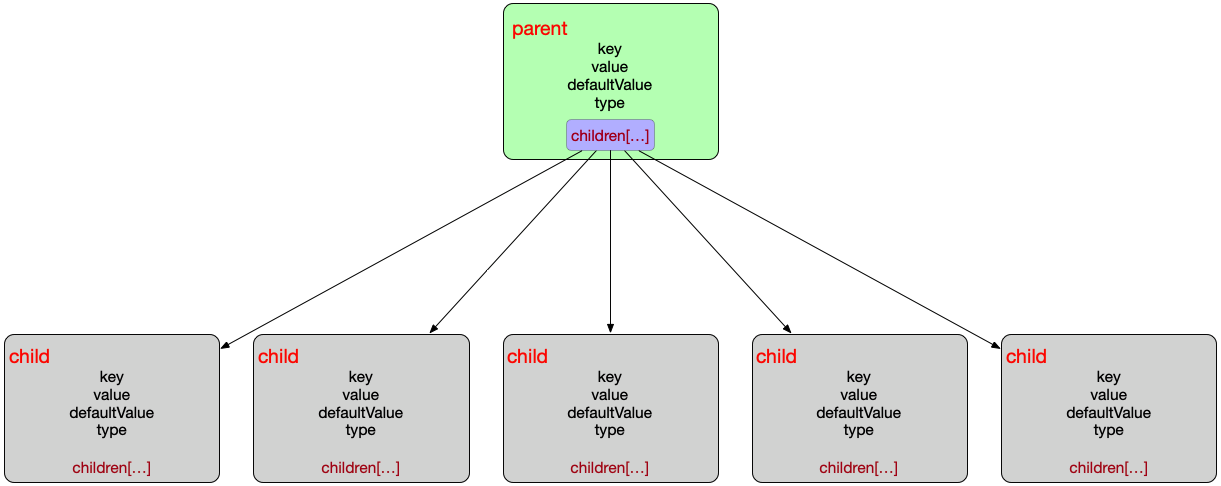
 - 筛选数据的结构为一个树结构
## 三、构造函数及参数配置
```dart
BrnSelectionView(
{Key key,
this.originalSelectionData,
@required this.onSelectionChanged,
this.selectionViewController,
this.configRowCount,
this.selectionConverterDelegate = defaultConverter,
this.onMenuClickInterceptor,
this.onCustomSelectionMenuClick,
this.onCustomFloatingLayerClick,
this.onMoreSelectionMenuClick,
this.onDefaultParamsPrepared,
this.onSelectionPreShow,
this.constantTop,
this.extraScrollController,
this.themeData})
```
### 参数说明
| **参数名** | **参数类型** | **作用** | **是否必填** | **默认值** |
| -------------------------- | ------------------------------------------------------------ | ------------------------------------------------------------ | ------------ | ---------- |
| originalSelectionData | `List<**BrnSelectionEntity**>` | 筛选所需数据用于展示筛选菜单栏,以及展开的筛选弹窗。 | 是 | 空 |
| selectionViewController | BrnSelectionViewController? | 用于主动控制筛选弹窗的关闭和刷新菜单的内容状态 | 否 | |
| onSelectionChanged | `void Function(int menuIndex, Map selectedParams, Map customParams, BrnSetCustomSelectionMenuTitle setCustomMenuTitle)` | 点击筛选弹窗中的【确认】按钮时回调给外部选中的参数,包括:
- 筛选数据的结构为一个树结构

## 三、构造函数及参数配置
```dart
BrnSelectionView(
{Key key,
this.originalSelectionData,
@required this.onSelectionChanged,
this.selectionViewController,
this.configRowCount,
this.selectionConverterDelegate = defaultConverter,
this.onMenuClickInterceptor,
this.onCustomSelectionMenuClick,
this.onCustomFloatingLayerClick,
this.onMoreSelectionMenuClick,
this.onDefaultParamsPrepared,
this.onSelectionPreShow,
this.constantTop,
this.extraScrollController,
this.themeData})
```
### 参数说明
| **参数名** | **参数类型** | **作用** | **是否必填** | **默认值** |
| -------------------------- | ------------------------------------------------------------ | ------------------------------------------------------------ | ------------ | ---------- |
| originalSelectionData | `List<**BrnSelectionEntity**>` | 筛选所需数据用于展示筛选菜单栏,以及展开的筛选弹窗。 | 是 | 空 |
| selectionViewController | BrnSelectionViewController? | 用于主动控制筛选弹窗的关闭和刷新菜单的内容状态 | 否 | |
| onSelectionChanged | `void Function(int menuIndex, Map selectedParams, Map customParams, BrnSetCustomSelectionMenuTitle setCustomMenuTitle)` | 点击筛选弹窗中的【确认】按钮时回调给外部选中的参数,包括:
menuIndex:当前展开的 menu 位置;
selectedParams 所有筛选弹窗中选中的参数;
customParams:拦截 CustomHandle 类型的筛选并设置的自定义参数;setCustomMenuTitle:对当前的筛选 Menu 设置 title 和高亮的回调函数,一般与 customParams 、**onCustomSelectionMenuClick**搭配使用,例如,通过 onCustomSelectionMenuClick 回调返回 customParams 参数,setCustomMenuTitle 根据 customParams 参数判断是否高亮,是否需要根据参数更新筛选菜单的 Title。 | 是 | |
| configRowCount | `BrnConfigTagCountPerRow(int index, BrnSelectionEntity entity)?` | 仅适用于类型为 SelectionWindowType.Range 的筛选弹窗,用于对 SelectionWindowType.Range 类型的列数做配置,回调参数为 menu 的所在位置 index 和 menu 的数据。 | 否 | 空 |
| selectionConverterDelegate | DefaultSelectionConverter | 用于对处理 originalSelectionData 筛选数据,返回选中的参数。返回选中的参数返回类型为 Map。 | 是 | |
| onCustomSelectionMenuClick | `Function(int index, BrnSelectionEntity customMenuItem, BrnSetCustomSelectionParams customSelectionParams)?` | 自定义(CustomHandle)类型的 menu 被点击的回调。
int index: 自定义 menu 所在位置 BrnSelectionEntity customMenuItem 自定义 menu 的数据
customSelectionParams:设置自定义参数 | 否 | |
| onCustomFloatingLayerClick | `Function(int index, BrnSelectionEntity customFloatingLayerEntity, BrnSetCustomFloatingLayerSelectionParams setCustomFloatingLayerSelectionParams)?` | 用于【**更多-筛选**】中自定义二级浮层的点击回调(自定义二级浮层类型为 customfloatinglayer) | 否 | |
| onMoreSelectionMenuClick | `void Function(int index, BrnOpenMorePage openMorePage)?` | 点击【更多】筛选项时的回调。
index 为点击的位置
openMorePage:让用户触发的回调,用于展开更多筛选页面。`OpenMorePage = void Function({bool updateData, List moreSelections});` | 否 | |
| onDefaultParamsPrepared | `void Function(Map selectedParams)?` | 数据初始化完成之后返回默认选中参数的回调,在 BrnSelectioinViewState **initState** 中回触发回调
Map selectedParams: 所有筛选菜单中的默认选中参数 | 否 | |
| onSelectionPreShow | `SelectionWindowType?` `SelectionWindowType Function(int index, BrnSelectionEntity entity);` | 筛选弹窗打开前的回调方法, 并返回 SelectionWindowType 指定展示类型,是 Range 类型还是 List 类型。调用时机早于 onMenuItemClick
int index:点击筛选菜单的位置。
BrnSelectionEntity entity: index 菜单位置的筛选数据。 | 否 | |
| onMenuClickInterceptor | `bool Function(int index)?` | 筛选菜单被点击时的回调函数,
返回 true 拦截 menu 点击事件
返回 false 不拦截
int index:被点击的菜单栏位置 | 否 | |
| constantTop | double? | 指定筛选弹窗相对于屏幕的顶部距离,默认 null 不指定位置,依附于筛选菜单组件下方。 | 否 | |
| extraScrollController | ScrollController? | 如需要在滚动视图中监听滚动状态并隐藏筛选弹窗,可以设置要监听的 ScrollController,当监听到滚动时筛选弹窗消失。 | 否 | |
### 其它数据结构
#### 筛选类型
```dart
enum BrnSelectionFilterType {
/// 未设置
none,
/// 不限类型
unLimit,
/// 单选列表、单选项 type 为 radio
radio,
/// 多选列表、多选项 type 为 checkbox
checkbox,
/// 一般的值范围自定义区间 type 为 range
range,
/// 日期选择,普通筛选时使用 CalendarView 展示选择时间,更多情况下使用 DatePicker 选择时间
date,
/// 自定义选择日期区间, type 为 dateRange
dateRange,
/// 自定义通过 Calendar 选择日期区间,type 为 dateRangeCalendar
dateRangeCalendar,
/// 标签筛选 type 为 customerTag
customHandle,
/// 更多列表、多选项 无 type
more,
/// 去二级页面
layer,
/// 去自定义二级页面
customLayer,
}
```
#### 筛选类型说明
| 筛选项类型 | 对应 Entity type 下发值 | 说明 |
| ----------------- | ----------------------- | ---------------------------------------------------------------------------------------------------------------------- |
| None | 无 | 未设置 type 数据时的值。 |
| UnLimit | umlimit | “不限”类型,它与兄弟结点选中状态互斥。 |
| Radio | radio | 单选,此类型与其他类型选中状态互斥。若 radio 类型的结点 |
| Checkbox | checkbox | 多选,此类型与非 CheckBox 类型选中状态互斥。 |
| Range | range | 一般值范围选择(如居室、价格、㎡ 等),与其他类型选中状态互斥。 |
| Date | date | 日期时间点单选,与其他类型选中状态互斥。在一般筛选中以日历视图展示选择时间。在更多筛选页中以 DatePicker 展示选择时间。 |
| DateRange | daterange | 日期范围选择,与其他类型选中状态互斥。以 DatePicker 展示选择时间。 |
| DateRangeCalendar | daterangecalendar | 日期范围选择,与其他类型选中状态互斥。以 日历视图展示选择时间。 |
| CustomHandle | customhandle | 自定义类型,用于标识筛选菜单自定义的情况,【一般其 children 不包含数据】。 |
| More | more | 更多筛选类型,用于标识筛选菜单点击之后跳转到更多筛选页的情况。 |
| Layer | floatinglayer | 更多筛选页子页面类型,用于标识更多筛选页的二级页面,点击之后跳转到更多筛选的二级页面。 |
| CustomLayer | customfloatinglayer | 去自定义二级页面 |
#### 筛选弹窗展示风格
```dart
enum SelectionWindowType {
list, //列表类型筛选弹窗,使用列表展示。
range, //标签类型筛选弹窗,使用 Tag + Range 的方式展示
}
```
#### 筛选 Entity:
```dart
class BrnSelectionEntity {
/// 类型 是单选、复选还是有自定义输入
String type;
/// 回传给服务器的 key
String key;
/// 回传给服务器的 value
String value;
/// 默认值
String defaultValue;
/// 显示的文案
String title;
/// 显示的文案
String subTitle;
/// 单位。例如居室、万,适配自定义区间填写的内容
String unit;
/// 扩展字段,目前只有min和max
Map extMap;
/// 子筛选项
List children;
//////////// 以上为接口下发的原始数据字段 ///////////////
//////////// 下方为组件另需要使用的字段 ///////////////
/// 是否选中
bool isSelected;
/// 自定义输入
Map customMap;
/// 用于临时存储原有自定义字段数据,在筛选数据变化后未点击【确定】按钮时还原。
Map originalCustomMap;
/// 最大可选数量
int maxSelectedCount;
/// 父级筛选项
BrnSelectionEntity parent;
/// 筛选类型,具体参见 [BrnSelectionFilterType]
BrnSelectionFilterType filterType;
/// 筛选弹窗展示风格对应的首字母小写的字符串,例如 `range`、`list`,参见 [BrnSelectionWindowType]
String showType;
/// 筛选弹窗展示风格,具体参见 [BrnSelectionWindowType]
BrnSelectionWindowType filterShowType;
/// 自定义标题
String customTitle;
///自定义筛选的 title
bool isCustomTitleHighLight;
/// 临时字段用于判断是否要将筛选项 [name] 字段拼接展示
bool canJoinTitle = false;
}
```
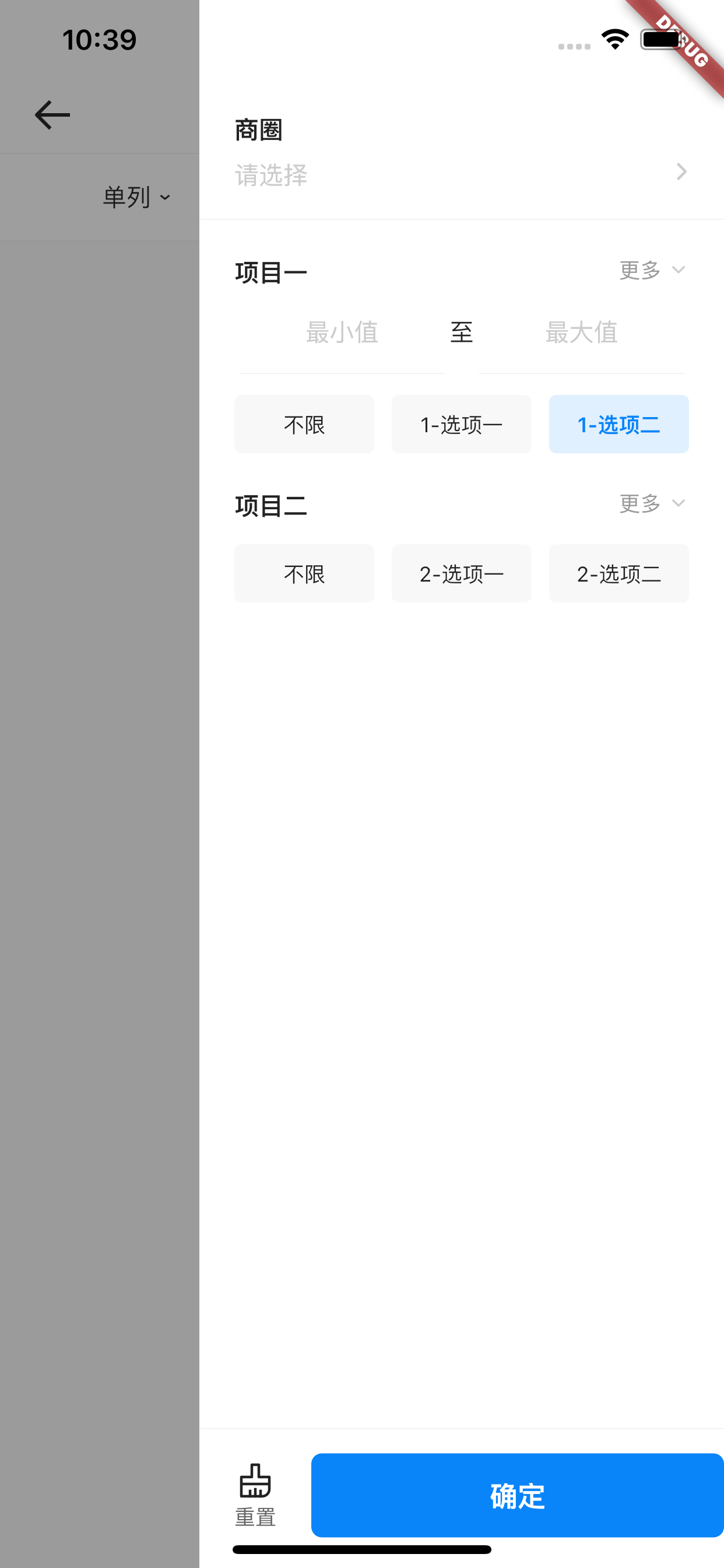
### 更多筛选页面
BrnMoreSelectionPage,一般由 BrnSelectionView 的 onMoreSelectionMenuClick 触发跳转
 ```dart
BrnMoreSelectionPage(
{this.entityData,
this.confirmCallback,
this.onCustomFloatingLayerClick,
this.themeData});
```
| 参数名 | 说明 | 是否必填 |
| -------------------------- | -------------------------------------------------------------------------------------- | -------- |
| entityData | 更多累心的筛选(more 类型) | 是 |
| confirmCallback | 更多筛选页面点击【确定】时的回调 | 否 |
| onCustomFloatingLayerClick | 自定义浮层类型(customfloatinglayer 类型)点击时的回调,一般用于自定义二级浮层跳转页面 | 否 |
### 更多筛选二级浮层页面
BrnLayerMoreSelectionPage,一般由 BrnMoreSelectionPage 触发跳转
```dart
BrnMoreSelectionPage(
{this.entityData,
this.confirmCallback,
this.onCustomFloatingLayerClick,
this.themeData});
```
| 参数名 | 说明 | 是否必填 |
| -------------------------- | -------------------------------------------------------------------------------------- | -------- |
| entityData | 更多累心的筛选(more 类型) | 是 |
| confirmCallback | 更多筛选页面点击【确定】时的回调 | 否 |
| onCustomFloatingLayerClick | 自定义浮层类型(customfloatinglayer 类型)点击时的回调,一般用于自定义二级浮层跳转页面 | 否 |
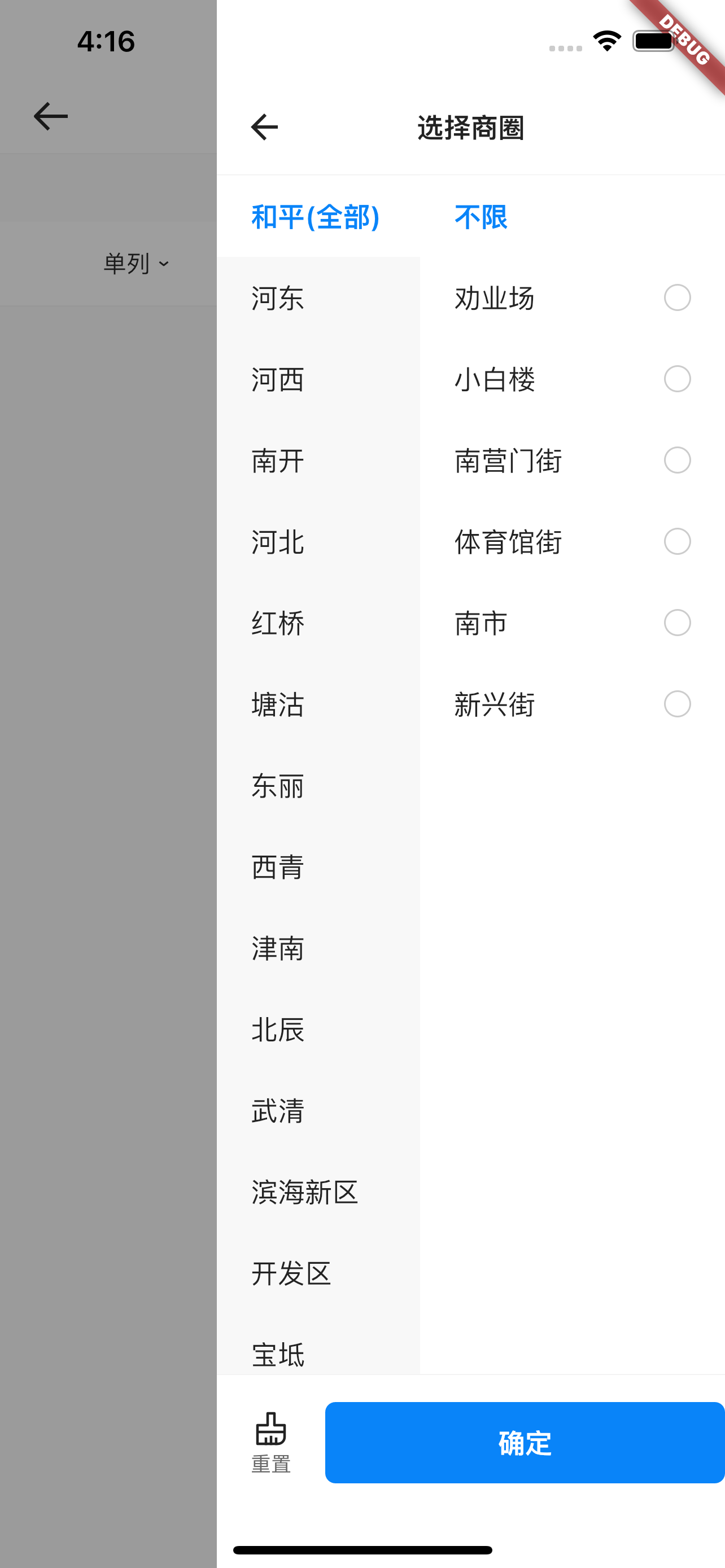
### 更多筛选二级浮层页面
BrnLayerMoreSelectionPage,一般由 BrnMoreSelectionPage 触发跳转
 ```dart
BrnLayerMoreSelectionPage({this.entityData, this.themeData});
```
| 参数名 | 说明 | 是否必填 |
| ---------- | -------------------------------------- | -------- |
| entityData | 二级浮层筛选数据(floatinglayer 类型) | 是 |
## 四、效果及代码展示
### 效果 1: 普通筛选弹窗-List 类型
[示例数据 multi_list_filter.json](https://bruno.ke.com/widgets/selection/brn-selection-view/multi_list_filter.json)
```dart
BrnLayerMoreSelectionPage({this.entityData, this.themeData});
```
| 参数名 | 说明 | 是否必填 |
| ---------- | -------------------------------------- | -------- |
| entityData | 二级浮层筛选数据(floatinglayer 类型) | 是 |
## 四、效果及代码展示
### 效果 1: 普通筛选弹窗-List 类型
[示例数据 multi_list_filter.json](https://bruno.ke.com/widgets/selection/brn-selection-view/multi_list_filter.json)
 ```dart
BrnSelectionView(
originalSelectionData: widget._filterData,
onSelectionChanged: (int menuIndex,
Map filterParams,
Map customParams,
BrnSetCustomSelectionMenuTitle setCustomTitleFunction) {
BrnToast.show(filterParams.toString(), context);
}
)
```
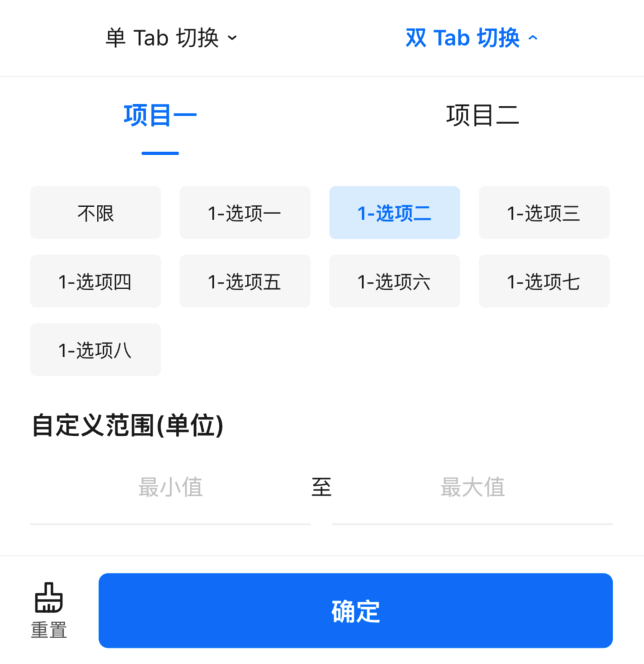
### 效果 2: 普通筛选弹窗-Range 类型
[示例数据 multi_range_filter.json](https://bruno.ke.com/widgets/selection/brn-selection-view/multi_range_filter.json)
```dart
BrnSelectionView(
originalSelectionData: widget._filterData,
onSelectionChanged: (int menuIndex,
Map filterParams,
Map customParams,
BrnSetCustomSelectionMenuTitle setCustomTitleFunction) {
BrnToast.show(filterParams.toString(), context);
}
)
```
### 效果 2: 普通筛选弹窗-Range 类型
[示例数据 multi_range_filter.json](https://bruno.ke.com/widgets/selection/brn-selection-view/multi_range_filter.json)
 ```dart
BrnSelectionView(
originalSelectionData: widget._filters,
onSelectionChanged: (int menuIndex,
Map filterParams,
Map customParams,
BrnSetCustomSelectionMenuTitle setCustomTitleFunction) {
BrnToast.show(filterParams.toString(), context);
},
onSelectionPreShow: (int index, BrnSelectionEntity entity) {
if (entity.key == "one_range_key" || entity.key == "two_range_key") {
return BrnSelectionWindowType.Range;
}
return entity.filterShowType;
},
)
```
### 效果 3: 更多筛选展示
[示例数据 more_filter.json](https://bruno.ke.com/widgets/selection/brn-selection-view/more_filter.json)
```dart
BrnSelectionView(
originalSelectionData: widget._filters,
onMoreSelectionMenuClick: (int index, BrnOpenMorePage openMore) {
/// 手动触发打开更多筛选页面
openMore(updateData: false);
},
onSelectionChanged: (int menuIndex,
Map filterParams,
Map customParams,
BrnSetCustomSelectionMenuTitle setCustomTitleFunction) {},
)
```
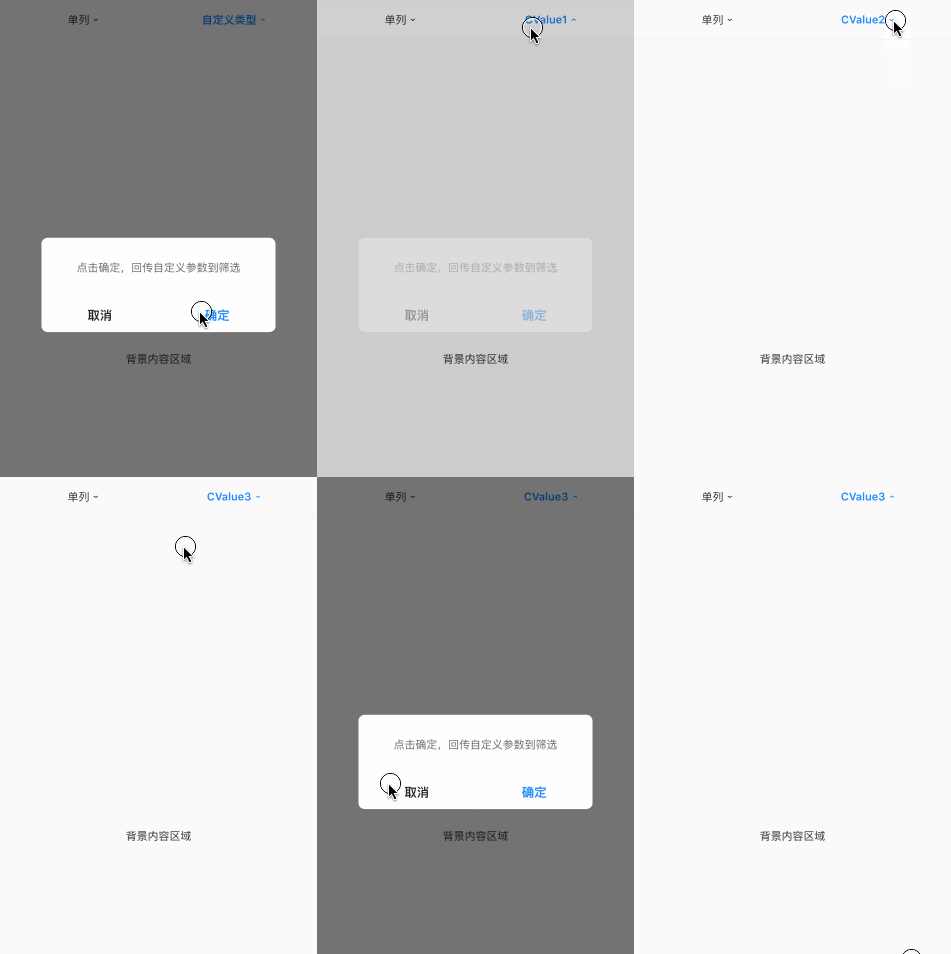
### 效果 4: 自定义筛选参数设置
[示例数据 customhandle_filter.json](https://bruno.ke.com/widgets/selection/brn-selection-view/customhandle_filter.json)
```dart
BrnSelectionView(
originalSelectionData: widget._filters,
onCustomSelectionMenuClick: (int index, BrnSelectionEntity customMenuItem,
BrnSetCustomSelectionParams customHandleCallBack) {
// ①用户操作之后,将自定义参数回传,触发 onSelectionChanged回调。
BrnDialogManager.showConfirmDialog(context,
cancel: '取消', confirm: '确定', message: '点击确定,回传自定义参数到筛选', confirmTap: () {
count++;
// ②回填自定义选中的参数,内部会触发 onSelectionChanged回调
customHandleCallBack({"CKey": "CValue" + '$count'});
}, cancelTap: () {});
},
onSelectionChanged: (int menuIndex,
Map filterParams,
Map customParams,
BrnSetCustomSelectionMenuTitle setCustomTitleFunction) {
if (menuIndex == 1 && setCustomTitleFunction != null) {
// ③手动设置对应的 menu title 和是否高亮
setCustomTitleFunction(
menuTitle:
BrunoTools.isEmpty(customParams) ? "" : customParams['CKey'] ?? "",
isMenuTitleHighLight: !BrunoTools.isEmpty(customParams['CKey']));
}
},
)
```
### 效果 5: 筛选日期范围选择
[示例数据 date_range_filter.json](https://bruno.ke.com/widgets/selection/brn-selection-view/date_range_filter.json)
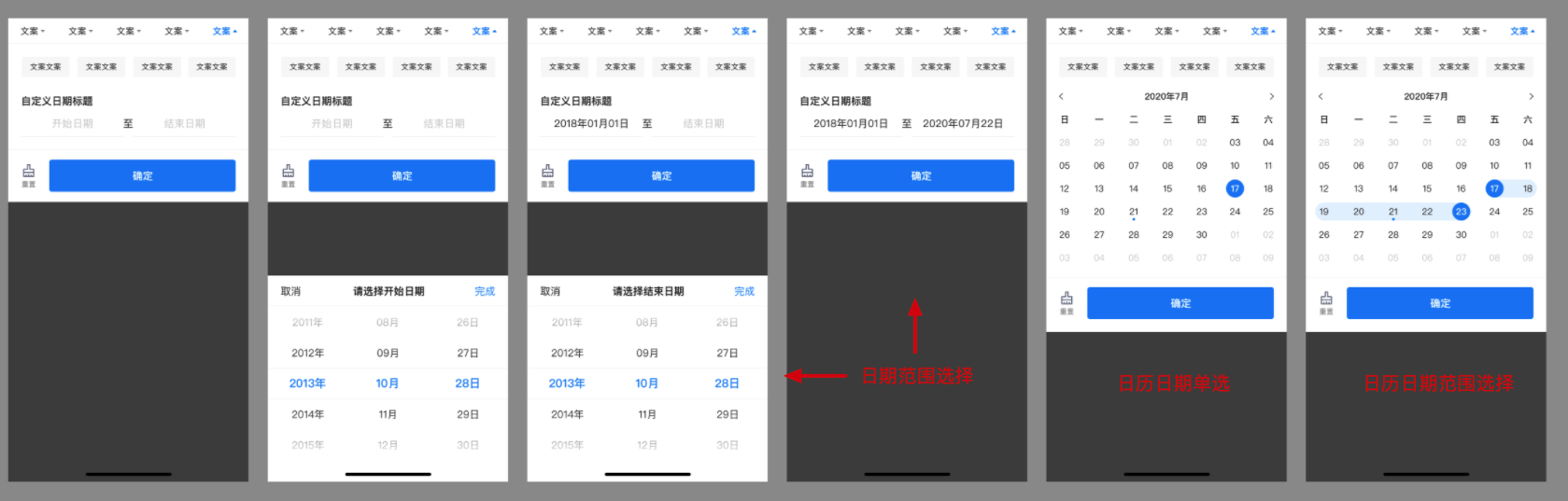
日期单择时【筛选子 item 】使用 date 类型。
- 日期范围选择跨度大时【筛选子 item】建议使用 daterange 类型。
- 日期范围选择跨度小时【筛选子 item】建议使用 daterangecalendar 类型。
```dart
BrnSelectionView(
selectionViewController: controller,
originalSelectionData: widget._filterData,
onSelectionChanged: (int menuIndex,
Map filterParams,
Map customParams,
BrnSetCustomSelectionMenuTitle setCustomTitleFunction) {
BrnToast.show(filterParams.toString(), context);
},
onSelectionPreShow: (int index, BrnSelectionEntity entity) {
if (entity.key == 'date_11' || entity.key == 'date_22') {
return BrnSelectionWindowType.Range;
}
return entity.filterShowType;
},
)
```
```dart
BrnSelectionView(
originalSelectionData: widget._filters,
onSelectionChanged: (int menuIndex,
Map filterParams,
Map customParams,
BrnSetCustomSelectionMenuTitle setCustomTitleFunction) {
BrnToast.show(filterParams.toString(), context);
},
onSelectionPreShow: (int index, BrnSelectionEntity entity) {
if (entity.key == "one_range_key" || entity.key == "two_range_key") {
return BrnSelectionWindowType.Range;
}
return entity.filterShowType;
},
)
```
### 效果 3: 更多筛选展示
[示例数据 more_filter.json](https://bruno.ke.com/widgets/selection/brn-selection-view/more_filter.json)
```dart
BrnSelectionView(
originalSelectionData: widget._filters,
onMoreSelectionMenuClick: (int index, BrnOpenMorePage openMore) {
/// 手动触发打开更多筛选页面
openMore(updateData: false);
},
onSelectionChanged: (int menuIndex,
Map filterParams,
Map customParams,
BrnSetCustomSelectionMenuTitle setCustomTitleFunction) {},
)
```
### 效果 4: 自定义筛选参数设置
[示例数据 customhandle_filter.json](https://bruno.ke.com/widgets/selection/brn-selection-view/customhandle_filter.json)

```dart
BrnSelectionView(
originalSelectionData: widget._filters,
onCustomSelectionMenuClick: (int index, BrnSelectionEntity customMenuItem,
BrnSetCustomSelectionParams customHandleCallBack) {
// ①用户操作之后,将自定义参数回传,触发 onSelectionChanged回调。
BrnDialogManager.showConfirmDialog(context,
cancel: '取消', confirm: '确定', message: '点击确定,回传自定义参数到筛选', confirmTap: () {
count++;
// ②回填自定义选中的参数,内部会触发 onSelectionChanged回调
customHandleCallBack({"CKey": "CValue" + '$count'});
}, cancelTap: () {});
},
onSelectionChanged: (int menuIndex,
Map filterParams,
Map customParams,
BrnSetCustomSelectionMenuTitle setCustomTitleFunction) {
if (menuIndex == 1 && setCustomTitleFunction != null) {
// ③手动设置对应的 menu title 和是否高亮
setCustomTitleFunction(
menuTitle:
BrunoTools.isEmpty(customParams) ? "" : customParams['CKey'] ?? "",
isMenuTitleHighLight: !BrunoTools.isEmpty(customParams['CKey']));
}
},
)
```
### 效果 5: 筛选日期范围选择
[示例数据 date_range_filter.json](https://bruno.ke.com/widgets/selection/brn-selection-view/date_range_filter.json)

日期单择时【筛选子 item 】使用 date 类型。
- 日期范围选择跨度大时【筛选子 item】建议使用 daterange 类型。
- 日期范围选择跨度小时【筛选子 item】建议使用 daterangecalendar 类型。
```dart
BrnSelectionView(
selectionViewController: controller,
originalSelectionData: widget._filterData,
onSelectionChanged: (int menuIndex,
Map filterParams,
Map customParams,
BrnSetCustomSelectionMenuTitle setCustomTitleFunction) {
BrnToast.show(filterParams.toString(), context);
},
onSelectionPreShow: (int index, BrnSelectionEntity entity) {
if (entity.key == 'date_11' || entity.key == 'date_22') {
return BrnSelectionWindowType.Range;
}
return entity.filterShowType;
},
)
```