---
title: BrnStepLine
group:
title: Step
order: 29
---
# BrnStepLine
垂直步骤条
## 一、效果总览
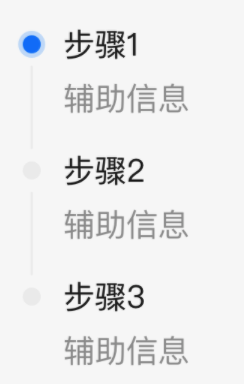
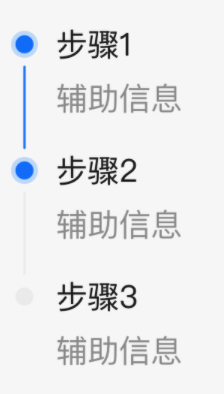
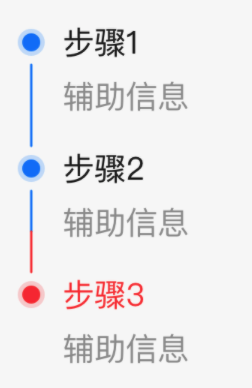 ## 二、组件说明
### 适用场景
1. 适用于分部展示
2. 适用于时间线的情况
### 交互规则
1. 该元件提供了一个垂直步骤的边框,使用时需要填充右侧的 widget
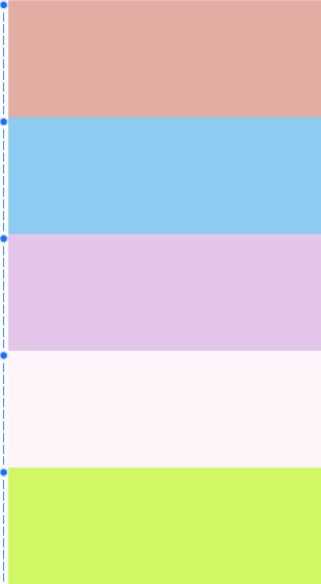
2. 支持虚线展示
## 三、构造函数及参数说明
### 构造函数
```dart
const BrnStepLine({
Key? key,
required this.contentWidget,
this.isGrey = false,
this.lineColor,
this.lineWidth = 2,
this.iconTopPadding = 0,
this.isDashLine = false,
this.dashLength = 4,
this.dashSpace = 4,
this.contentLeftPadding = 12,
this.normalColor,
this.highlightColor,
this.iconWidget,
}) : super(key: key);
```
### 参数说明
| **参数名** | **参数类型** | **描述** | **是否必填** | **默认值** |
| ------------------ | ------------ | ------------------------------------------------------------ | ------------ | ----------------- |
| contentWidget | Widget | 右侧显示的 widget | 是 | 无 |
| isGrey | bool | 是否整体是灰色:线条和 Icon | 否 | false |
| lineColor | dynamic | Color 或者 `List`,边框线的颜色,如果是数组则分段展示线条 | 否 | 主题色 |
| lineWidth | double | 线的宽度 | 否 | 2 |
| iconTopPadding | double | icon 距离所在 Item 项顶部的 padding | 否 | 0 |
| isDashLine | bool | 是否是虚线模式 | 否 | false |
| dashLength | double | 小虚线短的长度 | 否 | 4 |
| dashSpace | double | 小虚线段之间的间隔 | 否 | 4 |
| contentLeftPadding | double | contentWidget 距离左侧的 padding | 否 | 12 |
| normalColor | Color? | 普通状态(isGrey=true)的颜色 | 否 | Color(0xffeeeeee) |
| highlightColor | Color? | 高亮状态(isGrey=false)的颜色 | 否 | 主题色 |
| iconWidget | Widget? | 自定义 icon 的 widget | 否 | 无 |
## 四、代码演示
### 效果 1 :常规展示效果,第一个 Icon 为亮色
```dart
ListView.builder(
padding: EdgeInsets.only(top: 20),
physics: NeverScrollableScrollPhysics(),
shrinkWrap: true,
itemCount: 3,
itemBuilder: (context, index) {
return BrnStepLine(
lineWidth: 1,
//非第一个是灰色
isGrey: index !=0 ,
//最后一个的线条为透明色 做到不显示的效果
lineColor: Color(0xffeeeeee),
contentWidget: Container(
padding: EdgeInsets.only(left: 8),
child: Column(
crossAxisAlignment: CrossAxisAlignment.start,
children: [
Text(
'步骤${index + 1}',
style: TextStyle(
height: 0.9,
color: BrnThemeConfigurator.instance.getConfig().commonConfig.colorTextBase,
fontSize: 16,
),
),
Padding(
padding: const EdgeInsets.only(top: 20,bottom: 20),
child: Text(
'辅助信息',
style: TextStyle(
color: BrnThemeConfigurator.instance.getConfig().commonConfig.colorTextSecondary,
fontSize: 14,
),
),
)
],
),
),
);
},
)
```
### 效果 2:最后一个灰色
```dart
ListView.builder(
padding: EdgeInsets.only(top: 20),
physics: NeverScrollableScrollPhysics(),
shrinkWrap: true,
itemCount: 3,
itemBuilder: (context, index) {
return BrnStepLine(
lineWidth: 1,
//最后一个是灰色
isGrey: index == 2,
//最后一个的线条为透明色 做到不显示的效果
lineColor: index == 2 ? Colors.transparent : null,
highlightColor: BrnThemeConfigurator.instance.getConfig().commonConfig.brandPrimary,
contentWidget: Container(
padding: EdgeInsets.only(left: 8),
child: Column(
crossAxisAlignment: CrossAxisAlignment.start,
children: [
Text(
'步骤${index + 1}',
style: TextStyle(
height: 0.9,
color: BrnThemeConfigurator.instance.getConfig().commonConfig.colorTextBase,
fontSize: 16,
),
),
Padding(
padding: const EdgeInsets.only(top: 20,bottom: 20),
child: Text(
'辅助信息',
style: TextStyle(
color: BrnThemeConfigurator.instance.getConfig().commonConfig.colorTextSecondary,
fontSize: 14,
),
),
)
],
),
),
);
},
),
```
### 效果三:线条颜色变化
```dart
ListView.builder(
padding: EdgeInsets.only(top: 20),
physics: NeverScrollableScrollPhysics(),
shrinkWrap: true,
itemCount: 3,
itemBuilder: (context, index) {
return BrnStepLine(
lineWidth: 1,
//最后一个的线条为透明色 做到不显示的效果
lineColor: index == 2
? Colors.transparent
: (index == 1
? [
BrnThemeConfigurator.instance.getConfig().commonConfig.brandPrimary,
Colors.red
]
: null),
highlightColor: index == 2
? Colors.red
: BrnThemeConfigurator.instance.getConfig().commonConfig.brandPrimary,
contentWidget: Container(
padding: EdgeInsets.only(left: 8),
child: Column(
crossAxisAlignment: CrossAxisAlignment.start,
children: [
Text(
'步骤${index + 1}',
style: TextStyle(
height: 0.9,
color: BrnThemeConfigurator.instance
.getConfig()
.commonConfig
.colorTextBase,
fontSize: 16,
),
),
Padding(
padding: const EdgeInsets.only(top: 20, bottom: 20),
child: Text(
'辅助信息',
style: TextStyle(
color: BrnThemeConfigurator.instance
.getConfig()
.commonConfig
.colorTextSecondary,
fontSize: 14,
),
),
)
],
),
),
);
},
)
```
### 效果 4:虚线模式
## 二、组件说明
### 适用场景
1. 适用于分部展示
2. 适用于时间线的情况
### 交互规则
1. 该元件提供了一个垂直步骤的边框,使用时需要填充右侧的 widget
2. 支持虚线展示
## 三、构造函数及参数说明
### 构造函数
```dart
const BrnStepLine({
Key? key,
required this.contentWidget,
this.isGrey = false,
this.lineColor,
this.lineWidth = 2,
this.iconTopPadding = 0,
this.isDashLine = false,
this.dashLength = 4,
this.dashSpace = 4,
this.contentLeftPadding = 12,
this.normalColor,
this.highlightColor,
this.iconWidget,
}) : super(key: key);
```
### 参数说明
| **参数名** | **参数类型** | **描述** | **是否必填** | **默认值** |
| ------------------ | ------------ | ------------------------------------------------------------ | ------------ | ----------------- |
| contentWidget | Widget | 右侧显示的 widget | 是 | 无 |
| isGrey | bool | 是否整体是灰色:线条和 Icon | 否 | false |
| lineColor | dynamic | Color 或者 `List`,边框线的颜色,如果是数组则分段展示线条 | 否 | 主题色 |
| lineWidth | double | 线的宽度 | 否 | 2 |
| iconTopPadding | double | icon 距离所在 Item 项顶部的 padding | 否 | 0 |
| isDashLine | bool | 是否是虚线模式 | 否 | false |
| dashLength | double | 小虚线短的长度 | 否 | 4 |
| dashSpace | double | 小虚线段之间的间隔 | 否 | 4 |
| contentLeftPadding | double | contentWidget 距离左侧的 padding | 否 | 12 |
| normalColor | Color? | 普通状态(isGrey=true)的颜色 | 否 | Color(0xffeeeeee) |
| highlightColor | Color? | 高亮状态(isGrey=false)的颜色 | 否 | 主题色 |
| iconWidget | Widget? | 自定义 icon 的 widget | 否 | 无 |
## 四、代码演示
### 效果 1 :常规展示效果,第一个 Icon 为亮色
```dart
ListView.builder(
padding: EdgeInsets.only(top: 20),
physics: NeverScrollableScrollPhysics(),
shrinkWrap: true,
itemCount: 3,
itemBuilder: (context, index) {
return BrnStepLine(
lineWidth: 1,
//非第一个是灰色
isGrey: index !=0 ,
//最后一个的线条为透明色 做到不显示的效果
lineColor: Color(0xffeeeeee),
contentWidget: Container(
padding: EdgeInsets.only(left: 8),
child: Column(
crossAxisAlignment: CrossAxisAlignment.start,
children: [
Text(
'步骤${index + 1}',
style: TextStyle(
height: 0.9,
color: BrnThemeConfigurator.instance.getConfig().commonConfig.colorTextBase,
fontSize: 16,
),
),
Padding(
padding: const EdgeInsets.only(top: 20,bottom: 20),
child: Text(
'辅助信息',
style: TextStyle(
color: BrnThemeConfigurator.instance.getConfig().commonConfig.colorTextSecondary,
fontSize: 14,
),
),
)
],
),
),
);
},
)
```
### 效果 2:最后一个灰色
```dart
ListView.builder(
padding: EdgeInsets.only(top: 20),
physics: NeverScrollableScrollPhysics(),
shrinkWrap: true,
itemCount: 3,
itemBuilder: (context, index) {
return BrnStepLine(
lineWidth: 1,
//最后一个是灰色
isGrey: index == 2,
//最后一个的线条为透明色 做到不显示的效果
lineColor: index == 2 ? Colors.transparent : null,
highlightColor: BrnThemeConfigurator.instance.getConfig().commonConfig.brandPrimary,
contentWidget: Container(
padding: EdgeInsets.only(left: 8),
child: Column(
crossAxisAlignment: CrossAxisAlignment.start,
children: [
Text(
'步骤${index + 1}',
style: TextStyle(
height: 0.9,
color: BrnThemeConfigurator.instance.getConfig().commonConfig.colorTextBase,
fontSize: 16,
),
),
Padding(
padding: const EdgeInsets.only(top: 20,bottom: 20),
child: Text(
'辅助信息',
style: TextStyle(
color: BrnThemeConfigurator.instance.getConfig().commonConfig.colorTextSecondary,
fontSize: 14,
),
),
)
],
),
),
);
},
),
```
### 效果三:线条颜色变化
```dart
ListView.builder(
padding: EdgeInsets.only(top: 20),
physics: NeverScrollableScrollPhysics(),
shrinkWrap: true,
itemCount: 3,
itemBuilder: (context, index) {
return BrnStepLine(
lineWidth: 1,
//最后一个的线条为透明色 做到不显示的效果
lineColor: index == 2
? Colors.transparent
: (index == 1
? [
BrnThemeConfigurator.instance.getConfig().commonConfig.brandPrimary,
Colors.red
]
: null),
highlightColor: index == 2
? Colors.red
: BrnThemeConfigurator.instance.getConfig().commonConfig.brandPrimary,
contentWidget: Container(
padding: EdgeInsets.only(left: 8),
child: Column(
crossAxisAlignment: CrossAxisAlignment.start,
children: [
Text(
'步骤${index + 1}',
style: TextStyle(
height: 0.9,
color: BrnThemeConfigurator.instance
.getConfig()
.commonConfig
.colorTextBase,
fontSize: 16,
),
),
Padding(
padding: const EdgeInsets.only(top: 20, bottom: 20),
child: Text(
'辅助信息',
style: TextStyle(
color: BrnThemeConfigurator.instance
.getConfig()
.commonConfig
.colorTextSecondary,
fontSize: 14,
),
),
)
],
),
),
);
},
)
```
### 效果 4:虚线模式
 ```dart
ListView.builder(
shrinkWrap: true,
physics: NeverScrollableScrollPhysics(),
itemCount: 5,
itemBuilder: (context, index) {
return BrnStepLine(
lineWidth: 1,
lineColor: [
BrnThemeConfigurator.instance.getConfig().commonConfig.brandPrimary,
Colors.red,
],
isDashLine: true,
dashLength: 11,
contentWidget: Container(
height: 150,
color: getRandomColor(),
),
);
},
),
```
```dart
ListView.builder(
shrinkWrap: true,
physics: NeverScrollableScrollPhysics(),
itemCount: 5,
itemBuilder: (context, index) {
return BrnStepLine(
lineWidth: 1,
lineColor: [
BrnThemeConfigurator.instance.getConfig().commonConfig.brandPrimary,
Colors.red,
],
isDashLine: true,
dashLength: 11,
contentWidget: Container(
height: 150,
color: getRandomColor(),
),
);
},
),
```