# connectivity_plus
[](https://github.com/fluttercommunity/community)
[](https://pub.dev/packages/connectivity_plus)
[](https://pub.dev/packages/connectivity_plus/score)
[](https://github.com/fluttercommunity/plus_plugins/actions/workflows/connectivity_plus.yaml)
 This plugin allows Flutter apps to discover network connectivity and configure
themselves accordingly. It can distinguish between cellular vs WiFi connection.
> **Note**
>
> On Android, this does not guarantee connection to Internet. For instance, the app might have wifi access but it might be a VPN or a hotel WiFi > with no access.
## Platform Support
| Android | iOS | MacOS | Web | Linux | Windows |
| :-----: | :-: | :---: | :-: | :---: | :-----: |
| ✅ | ✅ | ✅ | ✅ | ✅ | ✅ |
## Usage
Sample usage to check current status:
```dart
import 'package:connectivity_plus/connectivity_plus.dart';
final connectivityResult = await (Connectivity().checkConnectivity());
if (connectivityResult == ConnectivityResult.mobile) {
// I am connected to a mobile network.
} else if (connectivityResult == ConnectivityResult.wifi) {
// I am connected to a wifi network.
} else if (connectivityResult == ConnectivityResult.ethernet) {
// I am connected to a ethernet network.
} else if (connectivityResult == ConnectivityResult.vpn) {
// I am connected to a vpn network.
// Note for iOS and macOS:
// There is no separate network interface type for [vpn].
// It returns [other] on any device (also simulator)
} else if (connectivityResult == ConnectivityResult.bluetooth) {
// I am connected to a bluetooth.
} else if (connectivityResult == ConnectivityResult.other) {
// I am connected to a network which is not in the above mentioned networks.
} else if (connectivityResult == ConnectivityResult.none) {
// I am not connected to any network.
}
```
> **Note**
>
> You should not be using the current network status for deciding whether you can reliably make a network connection. Always guard your app code against timeouts and errors that might come from the network layer.
You can also listen for network state changes by subscribing to the stream
exposed by connectivity plugin:
```dart
import 'package:connectivity_plus/connectivity_plus.dart';
@override
initState() {
super.initState();
subscription = Connectivity().onConnectivityChanged.listen((ConnectivityResult result) {
// Got a new connectivity status!
});
}
// Be sure to cancel subscription after you are done
@override
dispose() {
subscription.cancel();
super.dispose();
}
```
> **Note**
>
> Connectivity changes are no longer communicated to Android apps in the background starting with Android O (8.0). _You should always check for connectivity status when your app is resumed._ The broadcast is only useful when your application is in the foreground.
## Limitations on the web platform
In order to retrieve information about the quality/speed of a browser's connection, the web implementation of the `connectivity` plugin uses the browser's [**NetworkInformation** Web API](https://developer.mozilla.org/en-US/docs/Web/API/NetworkInformation), which as of this writing (June 2020) is still "experimental", and not available in all browsers:
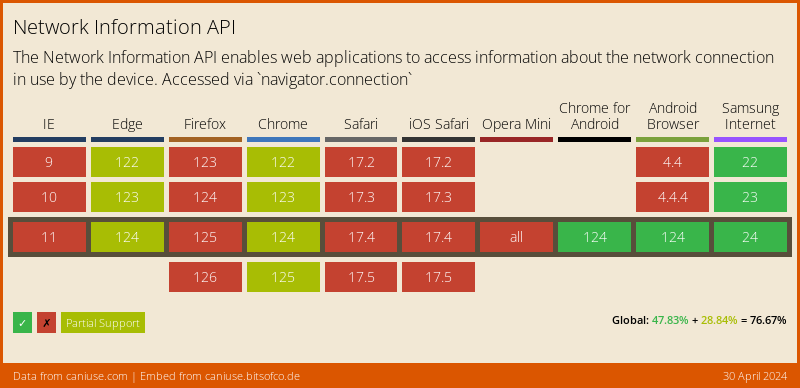
On desktop browsers, this API only returns a very broad set of connectivity statuses (One of `'slow-2g', '2g', '3g', or '4g'`), and may _not_ provide a Stream of changes. Firefox still hasn't enabled this feature by default.
**Fallback to `navigator.onLine`**
For those browsers where the NetworkInformation Web API is not available, the plugin falls back to the [**NavigatorOnLine** Web API](https://developer.mozilla.org/en-US/docs/Web/API/NavigatorOnLine), which is more broadly supported:
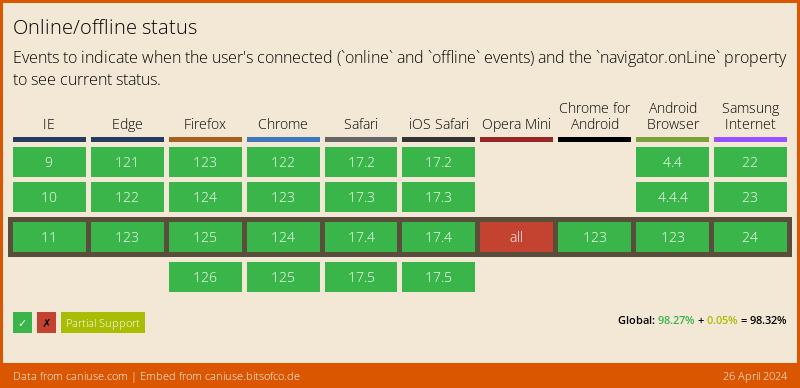
The NavigatorOnLine API is [provided by `dart:html`](https://api.dart.dev/stable/2.7.2/dart-html/Navigator/onLine.html), and only supports a boolean connectivity status (either online or offline), with no network speed information. In those cases the plugin will return either `wifi` (when the browser is online) or `none` (when it's not).
Other than the approximate "downlink" speed, where available, and due to security and privacy concerns, **no Web browser will provide** any specific information about the actual network your users' device is connected to, like **the SSID on a Wi-Fi, or the MAC address of their device.**
## Learn more
- [API Documentation](https://pub.dev/documentation/connectivity_plus/latest/connectivity_plus/connectivity_plus-library.html)
- [Plugin documentation website](https://plus.fluttercommunity.dev/docs/connectivity_plus/overview)
This plugin allows Flutter apps to discover network connectivity and configure
themselves accordingly. It can distinguish between cellular vs WiFi connection.
> **Note**
>
> On Android, this does not guarantee connection to Internet. For instance, the app might have wifi access but it might be a VPN or a hotel WiFi > with no access.
## Platform Support
| Android | iOS | MacOS | Web | Linux | Windows |
| :-----: | :-: | :---: | :-: | :---: | :-----: |
| ✅ | ✅ | ✅ | ✅ | ✅ | ✅ |
## Usage
Sample usage to check current status:
```dart
import 'package:connectivity_plus/connectivity_plus.dart';
final connectivityResult = await (Connectivity().checkConnectivity());
if (connectivityResult == ConnectivityResult.mobile) {
// I am connected to a mobile network.
} else if (connectivityResult == ConnectivityResult.wifi) {
// I am connected to a wifi network.
} else if (connectivityResult == ConnectivityResult.ethernet) {
// I am connected to a ethernet network.
} else if (connectivityResult == ConnectivityResult.vpn) {
// I am connected to a vpn network.
// Note for iOS and macOS:
// There is no separate network interface type for [vpn].
// It returns [other] on any device (also simulator)
} else if (connectivityResult == ConnectivityResult.bluetooth) {
// I am connected to a bluetooth.
} else if (connectivityResult == ConnectivityResult.other) {
// I am connected to a network which is not in the above mentioned networks.
} else if (connectivityResult == ConnectivityResult.none) {
// I am not connected to any network.
}
```
> **Note**
>
> You should not be using the current network status for deciding whether you can reliably make a network connection. Always guard your app code against timeouts and errors that might come from the network layer.
You can also listen for network state changes by subscribing to the stream
exposed by connectivity plugin:
```dart
import 'package:connectivity_plus/connectivity_plus.dart';
@override
initState() {
super.initState();
subscription = Connectivity().onConnectivityChanged.listen((ConnectivityResult result) {
// Got a new connectivity status!
});
}
// Be sure to cancel subscription after you are done
@override
dispose() {
subscription.cancel();
super.dispose();
}
```
> **Note**
>
> Connectivity changes are no longer communicated to Android apps in the background starting with Android O (8.0). _You should always check for connectivity status when your app is resumed._ The broadcast is only useful when your application is in the foreground.
## Limitations on the web platform
In order to retrieve information about the quality/speed of a browser's connection, the web implementation of the `connectivity` plugin uses the browser's [**NetworkInformation** Web API](https://developer.mozilla.org/en-US/docs/Web/API/NetworkInformation), which as of this writing (June 2020) is still "experimental", and not available in all browsers:

On desktop browsers, this API only returns a very broad set of connectivity statuses (One of `'slow-2g', '2g', '3g', or '4g'`), and may _not_ provide a Stream of changes. Firefox still hasn't enabled this feature by default.
**Fallback to `navigator.onLine`**
For those browsers where the NetworkInformation Web API is not available, the plugin falls back to the [**NavigatorOnLine** Web API](https://developer.mozilla.org/en-US/docs/Web/API/NavigatorOnLine), which is more broadly supported:

The NavigatorOnLine API is [provided by `dart:html`](https://api.dart.dev/stable/2.7.2/dart-html/Navigator/onLine.html), and only supports a boolean connectivity status (either online or offline), with no network speed information. In those cases the plugin will return either `wifi` (when the browser is online) or `none` (when it's not).
Other than the approximate "downlink" speed, where available, and due to security and privacy concerns, **no Web browser will provide** any specific information about the actual network your users' device is connected to, like **the SSID on a Wi-Fi, or the MAC address of their device.**
## Learn more
- [API Documentation](https://pub.dev/documentation/connectivity_plus/latest/connectivity_plus/connectivity_plus-library.html)
- [Plugin documentation website](https://plus.fluttercommunity.dev/docs/connectivity_plus/overview)